What Is a Magic Link? Magic Link Authentication Explained. A magic link is a single-use, short-lived login URL sent by email. How magic link authentication works, where it fails, and how to run it on Keycloak.
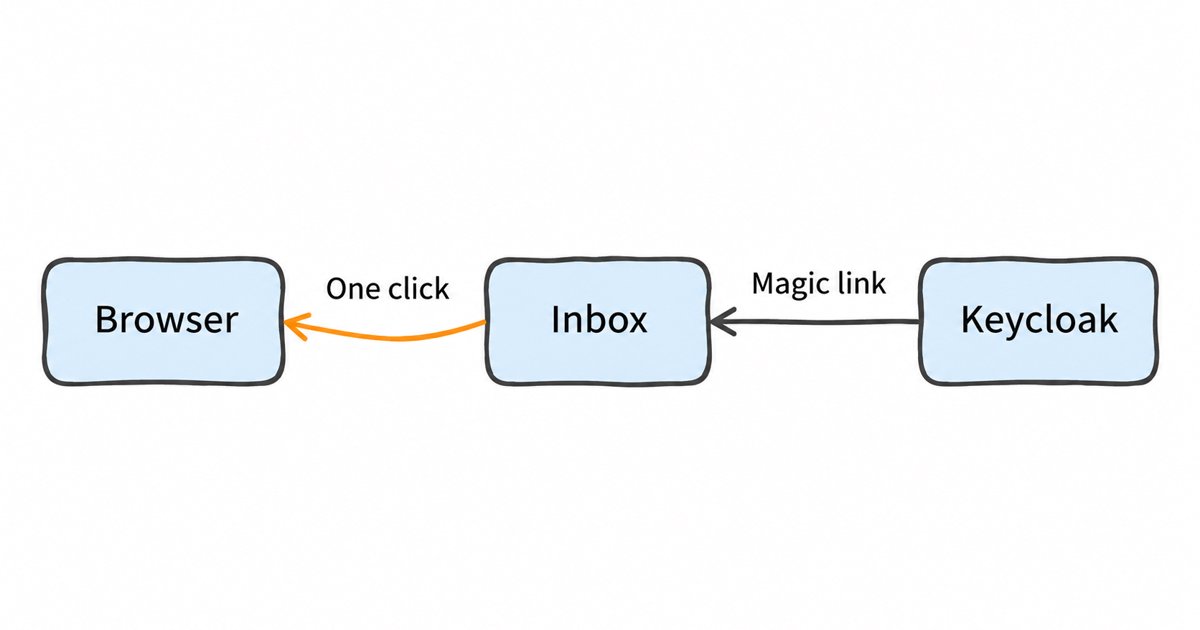
A magic link is a single-use, short-lived URL emailed to a user that signs them in when they click it, with no password. Clicking it proves they control the inbox, so the email account becomes the login factor, and the link is only as secure as that inbox and the token behind it.
That is the whole idea, and it is why magic link authentication feels so simple to users: they type an email address, open their mail and click. The hard part sits on the server side, in how the token is made, how long it lives, which browser may use it and what happens when something other than the user opens it first. This post walks through the flow step by step, the token design that makes it safe, the failure modes teams hit in production, how magic links compare with email codes and passkeys, and how to run magic links on Keycloak, whose documentation describes no built-in authenticator for them.
Key takeaways
- A magic link carries a random, single-use token that expires quickly; the OWASP Forgot Password Cheat Sheet asks the same of reset tokens: “Single use and expire after an appropriate period.”
- The email inbox is the factor, so anyone who controls the inbox can sign in. NIST’s SP 800-63B (revision 3) says email “SHALL NOT be used for out-of-band authentication” (NIST SP 800-63B, Sec. 5.1.3.1).
- Binding the link to the browser that asked for it stops forwarded links and email scanners from signing anyone in.
- Keycloak’s Server Administration Guide documents no magic link authenticator, so you add one as an extension, such as our open-source keycloak-magic-link.
What is a magic link in authentication?
In authentication, a magic link is a login link that contains a one-time secret. You enter your email address on a sign-in page, the service generates a random token, puts it in a URL and emails that URL to you. When you open it, the service checks the token, throws it away and starts your session. You never create or type a password, which is why magic links are counted as a passwordless login method alongside passkeys. Our explainer on passwordless login covers the wider family, and Authentication Methods Explained places it among the other methods Keycloak supports.
The phrase “magic link” also names a wireless CarPlay adapter, a wallet company and a handheld device, which is why searches for it return a mix of results. In this post it always means the login method.
It helps to see what the link really proves. It does not prove who the person is; it proves that whoever clicked could read mail sent to that address within the last few minutes. That is the same proof a “forgot password” email relies on, and in fact a magic link is close to a password reset link that skips the step of choosing a new password. Most of the security advice for reset links applies directly, which is why this post leans on the OWASP guidance for them.
How does a magic link login work, step by step?
A well-built magic link login goes through five steps:
- Request. You type your email address and submit it. The server answers with the same “check your email” page whether or not an account exists, so the form does not tell an attacker which addresses are registered.
- Token and email. If the account exists, the server generates a random token, stores a hash of it with an expiry time and the account it belongs to, and emails you a link that contains the token.
- Click. You open the email and click the link, which opens in your browser.
- Verify. The browser sends the token to the server, which looks it up and checks that it exists, has not been used, has not expired and, in a stricter design, was requested by this same browser.
- Session. The server deletes the token so it cannot be replayed, and signs you in. In an OpenID Connect setup, that means finishing the authorization request and issuing a code to the application.
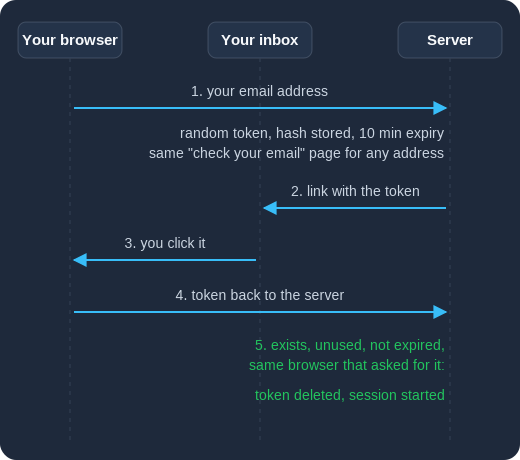
You send your email address (1), and the server stores a hash of a new random token with a 10 minute expiry, showing the same page for any address. It emails you a link with the token (2), you click it (3) and the browser sends the token back (4). The server checks that it exists, is unused, has not expired and comes from the browser that asked for it, then deletes it and starts your session (5).
What makes a magic link token secure?
The token is the only thing standing between an attacker and the account, so its design matters more than anything on the login page. Four properties carry most of the weight.
It is random and long enough. The OWASP Forgot Password Cheat Sheet says tokens should be “Generated using a cryptographically secure random number generator” and “Long enough to protect against brute-force attacks” (OWASP, general security practices). A token derived from a user ID, a timestamp or a weak random function can be guessed, and then nobody needs the inbox at all. Storing a hash of the token rather than the token itself also means a leaked database does not hand out working links.
It works once and expires quickly. OWASP says reset tokens should be “Invalidated after they have been used” (OWASP, general security practices). NIST’s out-of-band rules are a useful benchmark for the lifetime even though email does not qualify as an out-of-band channel there: they say “the authentication SHALL be considered invalid if not completed within 10 minutes” and that verifiers “SHALL accept a given authentication secret only once during the validity period” (NIST SP 800-63B, Sec. 5.1.3.2). Ten minutes is long enough for slow mail delivery and short enough that an old email sitting in an inbox is useless.
It is bound to the browser that asked for it. A plain magic link works in any browser, so a forwarded link, an intercepted link or one that an email security scanner opens will sign that other client in, or at least burn the token before the user gets to it. The fix is to set a cookie in the requesting browser when the link is issued and to accept the token only when that cookie comes back with it. The cost is that a user who requests the link on a laptop and opens it on a phone cannot finish, so this is a choice you make deliberately.
It does not break the rest of the login protocol. If your application uses OAuth 2.0 with PKCE, the magic link step sits in the middle of an authorization request that already carries a code challenge. PKCE exists because “public clients utilizing the Authorization Code Grant are susceptible to the authorization code interception attack” (RFC 7636, Abstract), so the magic link handler has to carry that challenge through and issue a code that is still bound to it. A handler that starts a fresh session and redirects without the original parameters quietly removes that protection.
The link itself also needs some care. OWASP’s advice for reset URLs is “Don’t rely on the Host header while creating the reset URLs to avoid Host Header Injection attacks”, and the page that receives the token should send a Referrer Policy of no-referrer so the token does not leak to third-party resources (OWASP, URL tokens). The Better Auth OAuth state and magic link bug shows one more rule in practice: a magic link token should be stored and redeemed only as a magic link token, never through a lookup that other features share.
What are the security risks of magic links?
Magic links remove password reuse and credential stuffing, because there is no password to reuse or stuff, but they bring their own risks. These are the ones teams run into in production.
- Inbox compromise. Anyone who can read the user’s mail can sign in as them, so the account is exactly as strong as the email account and its own MFA. This is the main reason NIST’s revision 3 guidance says methods that do not prove possession of a specific device, “such as voice-over-IP (VOIP) or email, SHALL NOT be used for out-of-band authentication” (NIST SP 800-63B, Sec. 5.1.3.1). The revision 3 page itself notes that it has been superseded by SP 800-63-4, which our authentication methods guide maps to Keycloak, but the reasoning still holds: email shows control of an account, not possession of a device.
- Link scanners consuming tokens. Some mail security tools open the links in incoming messages to check them before the user sees them. If your server burns the token on the first GET request, the scanner uses it up and the user sees an “expired link” error. Browser binding solves this, because the scanner has no cookie, and a page that asks the user to confirm with a button before the token is used is the other common answer. The keycloak-magic-link README uses the first for the login flow and a two-step confirm for links an administrator issues.
- Forwarded and intercepted links. Without browser binding, whoever opens the link first gets the session, so a login email forwarded to a colleague or a personal account hands that person the login.
- Account enumeration. If the request form says “no account with that email”, attackers can test lists of addresses. OWASP says to “Return a consistent message for both existent and non-existent accounts” (OWASP Forgot Password Cheat Sheet, introduction), and its Authentication Cheat Sheet says “An application should respond (both HTTP and HTML) in a generic manner” (OWASP, authentication and error messages).
- Phishing lookalikes. Users learn to click login links in email, which is exactly the habit phishing exploits. A lookalike email can lead to a fake “check your email” page that asks for something else. Keep your login emails plain and consistent, and send them from your own domain through a properly configured mail server; our Keycloak email configuration guide covers SMTP setup and templates.
- Email flooding. A public request form can be used to send many emails to one address or from one IP. Rate limits per address and per client address keep it from becoming a spam tool and from exhausting your mail provider’s quota.
Identity management as a service, on open source
Skycloak is a managed identity platform in the same category as Auth0 or Okta, built on real upstream Keycloak. You get SSO, MFA, SCIM and audit logs without running the servers, and you can export and self-host whenever you want.
Magic links vs email OTP codes vs passkeys
Readers weighing passwordless options usually end up comparing these three. Email one-time codes work like magic links, except that the user types a short code from the email instead of clicking; our post on what OTP is and how it helps covers the background. Passkeys are a different kind of credential: a key pair stored on the user’s device, which the FIDO Alliance describes as built for “phishing-resistant authentication” (FIDO Alliance).
| Magic link | Email OTP code | Passkey | |
|---|---|---|---|
| What the user does | Clicks a link in the email | Types a code from the email | Unlocks the device (fingerprint, face or PIN) |
| What it proves | Control of the inbox | Control of the inbox | Possession of a key bound to the device and site |
| Works across devices | Not with browser binding | Yes, the code can be typed anywhere | Yes with synced passkeys |
| Resists phishing | No | No, a fake page can ask for the code | Yes, the key only signs for its own site |
| Main failure mode | Scanners and forwarded links | Codes relayed through fake pages | Lost device without a second passkey |
| Setup for the user | None | None | Register a passkey once |
In short, magic links and email codes are easy to start with because every user already has an email address, while passkeys need a one-time registration but are the only one of the three that stands up to phishing. You can also combine them: use a magic link or email code for sign-up and first login, then ask the user to add a passkey. Our complete guide to Keycloak passkeys and WebAuthn walks through that side.
When do magic links fit, and when do they hurt?
Magic links fit products where people sign in rarely and passwords get forgotten between visits, such as consumer apps, newsletters, marketplaces and early-stage SaaS trials. They also fit invitation flows, where an email is already the first contact with the user. In those settings, removing the password also removes password resets and the exposure that comes with reused passwords.
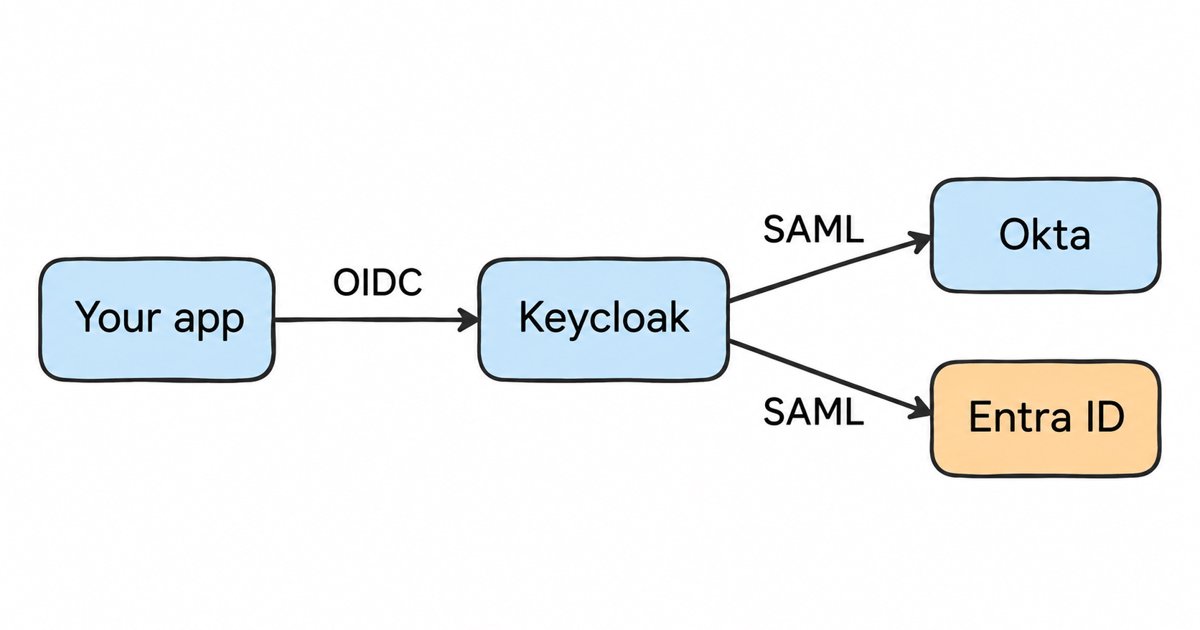
They hurt in three situations. The first is cross-device sign-in: a user who asks for the link on a TV, a shared kiosk or a work laptop but reads mail on a phone cannot finish a browser-bound link, and an unbound link brings back the forwarding risk, so an email code is often the better choice there. The second is frequent sign-in, where switching to the inbox every time becomes friction rather than convenience. The third is enterprise customers. When a business customer runs its own identity provider such as Okta or Microsoft Entra ID, it expects users to sign in through that provider with single sign-on, its MFA and its offboarding. A magic link to the user’s work email skips all of that, and a user who has left the company may still be able to read forwarded mail. For B2B products, offer single sign-on for those customers and keep magic links for everyone else; our post on enterprise passkeys for B2B SaaS compares those choices for business accounts.
How do you add magic links to Keycloak?
As far as we know, upstream Keycloak does not include a magic link authenticator. Its Server Administration Guide has sections on password policies, one-time password policies, Kerberos, X.509 client certificates, WebAuthn and passkeys, but none on magic links, and the README of the extension below puts it plainly: “Keycloak has shipped without first-class magic-link login for years” (keycloak-magic-link README, Why this one). Keycloak is built to be extended, though, and a magic link step can be added to an authentication flow like any other authenticator.
Skycloak publishes an open-source extension for this, keycloak-magic-link, which its README says is built and maintained by the Skycloak team. Its README gives the license as Apache 2.0, names the supported Keycloak versions in its compatibility section, describes it as one small jar with no extra service to run, and lists the realm’s email (SMTP) settings among its prerequisites. Its security model section lists what it enforces:
- Each link can be used one time, and it stops working after a lifespan you can configure, which is 600 seconds unless you change it (per-flow configuration).
- In the login flow, a link finishes signing in only in the same browser that asked for it, which a cookie set on that browser enforces. A forwarded link therefore fails elsewhere, and because the cookie is checked before the token is used up, a scanner that opens the link without the cookie fails and leaves the link valid for the user (security model).
- Authorization codes “stay bound to the client’s PKCE challenge” (security model).
- The form shows the same “check your email” page whether or not the address exists (security model).
- Requests are rate-limited per IP and per email address (security model); the per-flow configuration table gives the default limit for each.
- Logins emit Keycloak’s normal login and login error events, and the security model states that neither the link nor its token appears in those events.
To use it in the login page, the README’s Mode A section describes three steps: in Authentication > Flows, make a copy of the built-in browser flow, add the extension’s authenticator to that copy as a required step, then bind the copy as the browser flow, or override it on one client from that client’s Advanced tab. Disable the username and password form in the copy if you want the link to replace the password rather than follow it. If executions and sub-flows are new to you, our walkthrough on building custom authentication flows in Keycloak explains them. The README’s Mode B section covers a second way to use it, a REST endpoint that lets a backend holding the right role mint a link for a user.
To try it before touching a real realm, the README’s local demo builds the JAR and starts Keycloak with a mail catcher:
git clone https://github.com/sky-cloak/keycloak-magic-link.git
cd keycloak-magic-link
mvn package && docker compose up
The README’s Try it locally section then has you sign in to the demo realm’s account page with a demo user’s address and open the emailed link from the MailHog inbox in the same browser; opening it from a different browser shows the same-browser check rejecting it.
On Skycloak managed Keycloak, the extensions documentation describes installing extension JARs from a cluster’s Extensions page in the dashboard rather than copying files onto servers, and the flow setup in the admin console is the same as above.
Frequently asked questions
Are magic links secure?
They are as secure as the user’s inbox and the token design. A random, hashed, single-use token with a short expiry, bound to the requesting browser and paired with rate limits and a generic response, is a reasonable login for most consumer products. They are not phishing-resistant, and NIST’s revision 3 guidance does not accept email as an out-of-band authenticator (NIST SP 800-63B, Sec. 5.1.3.1), so for high-assurance logins use passkeys or add a second factor.
How long should a magic link stay valid?
Keep it short. Ten minutes is a common choice: it matches the limit NIST sets for out-of-band secrets (NIST SP 800-63B, Sec. 5.1.3.2) and the default of the keycloak-magic-link extension. Longer lifetimes mostly help an attacker who gets to old mail.
Why does my magic link say it has expired when I click it?
Either the link really did pass its expiry time, or something opened it before you did, most often a mail security scanner, and the server counted that visit as the one use of the token. A server that binds the link to the requesting browser, or asks for a confirming click, avoids the scanner problem.
Is a magic link the same as a one-time password?
Both send a one-time secret to your inbox, but a magic link carries it inside a URL you click, while an email OTP is a short code you type. Codes work across devices; links are easier on the device that asked for them.
Does Keycloak support magic links?
Not as far as we know: its Server Administration Guide documents no magic link authenticator. You add a magic link authenticator as an extension, such as the open-source keycloak-magic-link, and place it in a copy of the browser flow.
What to do next
If you are evaluating magic links, start by deciding how you will handle the three things that break them: email scanners, cross-device sign-in and enterprise customers who need single sign-on. Then check any implementation you consider against the token rules above (random, hashed, single use, short expiry, browser-bound and PKCE-preserving). To see one working, run the keycloak-magic-link Docker Compose demo locally, and pilot it on a single client before you change a realm’s default flow.
See what passwordless login includes on Skycloak managed Keycloak on our passwordless feature page.