
SAP NetWeaver CVE-2026-120017: Auth Bypass as Any User. CVE-2026-120017 (CVSS 10.0) lets an unauthenticated attacker log in to SAP NetWeaver AS ABAP as any user. Check exposure, apply SAP Note 3849308, rotate trust.
CVE-2026-120017 (CVSS 10.0) is a flaw in SAP NetWeaver AS ABAP and ABAP Platform where, under certain configurations, incoming authentication assertions are not verified strictly enough, so an unauthenticated attacker could be accepted as any user. SAP’s own CVE record names the affected component as the SAML2 Service Provider, says the attacker can “impersonate arbitrary users, including privileged accounts”, and lists SAP_BASIS 702, 731, 740, 750 to 758, 816 and 920 to 922 as affected (CVE-2026-120017 record, NVD). Apply SAP Security Note 3849308 now (SAP Security Patch Day, November 2026), then check what the trust configuration behind your single sign-on looks like and rotate it where an attacker could have touched it.
This post is for SAP Basis administrators, security engineers and IAM leads who run NetWeaver behind single sign-on and want to know two things today: whether their systems are exposed, and what to do after the patch is in. We go through the advisory as published, a quick way to check your landscape, what you can do if patching has to wait, which log signals are worth a look, and how to rotate trust once the fix is in place. Since many teams put an identity provider such as Keycloak in front of SAP, we finish with the signing, audience and lifetime settings on that side.
Key takeaways
- Affected: SAP NetWeaver AS ABAP and ABAP Platform (SAML2 Service Provider),
SAP_BASIS702, 731, 740, 750 to 758, 816 and 920 to 922, scored 10.0 with the vectorAV:N/AC:L/PR:N/UI:N/S:C/C:H/I:H/A:H(CVE record).- The fix is SAP Note 3849308, released on SAP’s 10 November 2026 Patch Day (SAP).
- CISA’s coordinator assessment in the same record says exploitation “none”, automatable “yes” and technical impact “total” (CVE record), and we did not find the CVE in CISA’s Known Exploited Vulnerabilities catalog when we checked catalog version 2026.11.13 (JSON feed).
- The patch stops new forged logins, but it does not undo anything a forged administrator session may already have changed, such as an extra trusted identity provider or a new user.
What does CVE-2026-120017 do?
SAP is the CVE Numbering Authority for its own products, so the CVE record is SAP’s own description. It says that “SAP NetWeaver AS ABAP and ABAP Platform does not perform sufficient verification of incoming authentication assertions under certain configurations”, that “an unauthenticated attacker could submit specially crafted data to bypass authentication and impersonate arbitrary users, including privileged accounts”, and that the impact can extend “to connected components and systems beyond the affected system” (CVE-2026-120017 record). The record’s title is “Missing Authentication in SAP NetWeaver AS ABAP and ABAP Platform (SAML2 Service Provider)”, and its weakness is CWE-347, “Improper Verification of Cryptographic Signature”.
An authentication assertion is the signed statement an identity provider (IdP) hands to an application to say “this person has logged in, and here is who they are”. In SAML 2.0, which is the protocol the record names, the IdP signs the assertion with its private key, and the service provider (SP), here the ABAP system, checks that signature against the IdP certificate it trusts before it creates a session (OWASP SAML Security Cheat Sheet, IdP SAML Signing). If the SP skips or weakens that check, anyone who can reach the login endpoint can write their own assertion naming any user and be logged in as that user. That is why the score is a 10.0: the attacker needs no account, no user interaction and nothing more than network access to the SAML endpoint, and the “changed scope” part of the vector means the damage reaches past the vulnerable component.
| Item | Detail |
|---|---|
| CVE | CVE-2026-120017 |
| Component | SAP NetWeaver AS ABAP and ABAP Platform (SAML2 Service Provider) |
Affected SAP_BASIS releases |
702, 731, 740, 750, 751, 752, 753, 754, 755, 756, 757, 758, 816, 920, 921, 922 (CVE record) |
| CVSS 3.1 | 10.0, AV:N/AC:L/PR:N/UI:N/S:C/C:H/I:H/A:H |
| Weakness | CWE-347, Improper Verification of Cryptographic Signature |
| Fix | SAP Note 3849308 (SAP Security Patch Day, November 2026) |
| Known exploitation | None reported in the CVE record’s CISA assessment; we did not find it in the KEV catalog when we checked version 2026.11.13 |
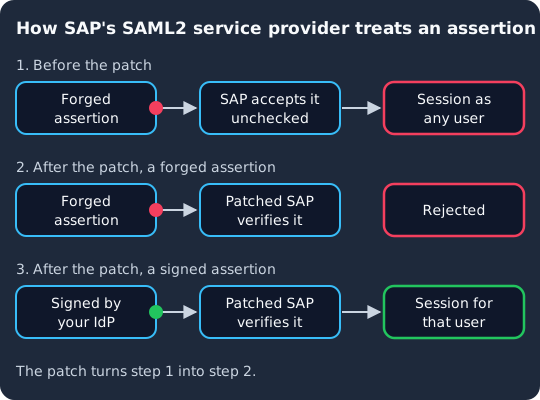
Before the patch, a forged assertion can reach the ABAP system and be accepted as any user. After the patch, the system should reject the same forged assertion, while an assertion your identity provider really signed still opens a session for that user.
Are your NetWeaver systems exposed?
The record says “under certain configurations”, and SAP Note 3849308 itself sits behind an SAP support login, so read the note for the exact conditions and correction instructions before you rule a system out. Until you have, a reasonable working rule is that a system is in scope when both of these are true:
- Its
SAP_BASISrelease is on the affected list (702, 731, 740, 750 to 758, 816, 920 to 922), at a support package level the note does not already cover. - It acts as a SAML 2.0 service provider. On AS ABAP, SAML 2.0 is configured in transaction
SAML2, where the identity providers the system trusts are listed on the Trusted Provider tab (SAP Help, SAP Gateway host as the SAML2 service provider). Typical cases are Fiori launchpad or SAP GUI for HTML logons behind a corporate IdP.
For a quick check from outside, RedRays suggests requesting the service provider metadata endpoint, /sap/saml2/sp/metadata?sap-client= followed by the client number: if it returns SP metadata XML, SAML2 is enabled on that client (RedRays, SAP Note 3849308 analysis). Run that against every client of every system, including the ones you think nobody uses, and pay most attention to systems whose SAML endpoints are reachable from the internet or from partner networks.
A note of caution on reading the configuration: this CVE is about the system not verifying strictly enough, so a trusted provider configuration that looks strict is not proof that you are safe. Use the release and the note as the deciding test.
How do you patch it?
Implement SAP Note 3849308 through your normal route (SNOTE for the correction instructions, or the support package that contains it), as listed on SAP’s November 2026 Patch Day page. SAP rates the note Critical on that page. Start with the systems that expose SAML endpoints to the internet, then partner-facing systems, then internal ones, and test a normal SSO logon on each one afterwards so that you know legitimate assertions still go through.
Because the CVE record says the impact can reach connected systems, do not stop at the system you think of as “the SAP login”. Trusted RFC connections and other integrations mean that a forged administrator session on a less important system can be a way into a more important one, which is why every affected system in the landscape needs the note, not only the obvious one.
What can you do if you cannot patch today?
RedRays states that “there is no workaround, so patching is the only real fix” (RedRays), so check the current version of SAP Note 3849308 in case SAP has added one since. Until the note is in, the steps we would take reduce who can reach the vulnerable endpoint rather than fix it:
- Restrict network access to the SAML2 endpoints (the paths under
/sap/saml2/) so that only your users’ networks and VPN can reach them, and block them from the internet at your web dispatcher, reverse proxy or firewall wherever the business allows. - Disable SAML2 on clients that do not need it, which the metadata check above helps you find.
- Watch privileged logons closely until the patch is in, using the signals in the next section.
None of this helps against an attacker who can already reach the endpoint from an allowed network, so treat it as a short bridge to the patch.
What should you look for in the logs?
We found no indicators of compromise for this CVE in the sources linked here, so we know of no log line that proves exploitation. RedRays recommends looking through security audit logs “for SAML logons of privileged users from unexpected sources” (RedRays). We would add a few checks for the period your systems ran unpatched:
- SAML logons with no matching login at your IdP. Every legitimate SAML logon starts with a login at your identity provider, so a SAP logon for a user who did not sign in at the IdP at that time is the strongest signal you will get. This is the reason to keep IdP login events for at least as long as your SAP security audit log.
- Logons as technical, emergency or dormant users, or as users who normally never use the browser.
- New users, role and profile changes, especially anything that grants broad authorizations.
- Changes in transaction
SAML2: a new trusted provider, a replaced IdP certificate, or changed signature settings. An attacker who becomes an administrator can add their own IdP, and that trust stays after you patch. - Changes to RFC destinations, certificates in the system’s trust stores and security audit log settings, since those are how an attacker keeps access or hides it.
Patched on the day, not on your next maintenance window
Keycloak 26.7.2 fixed CVE-2026-18963, an account takeover through password reset. Skycloak had it available for auto-upgrade and told customers the same day upstream shipped it. Self-hosted teams schedule that work themselves.
How do you rotate trust after patching?
The flaw is on the SAP side, in how the service provider checks assertions, so it does not by itself leak your IdP’s private signing key. It can let an attacker act as an administrator for as long as the system was exposed, and anything they configured in that time survives the patch. Rotation is about restoring a trust configuration you know is yours. We suggest this order, system by system:
- Patch first. Rotating trust on a system that still accepts forged assertions changes nothing, because the attacker does not need your keys.
- Rebuild the trusted provider list from a known-good source. In transaction
SAML2, compare each trusted provider and its signing certificate with your IdP’s current metadata, and remove any provider or certificate you cannot account for. - Rotate the IdP signing key if you have any doubt about it, or if the certificate is old anyway. Load the new certificate into SAP before the IdP starts signing with it, so that logons keep working during the switch (the Keycloak section below shows that order).
- Rotate what an administrator could read. If the logs show privileged logons you cannot explain, treat passwords stored in RFC destinations, service user passwords and the system’s own SAML keys as exposed, and change them on both ends.
- End existing sessions so that any session created with a forged assertion before the patch does not live on.
For another authentication bypass followed by a rotation plan, see our Aruba AOS authentication bypass post. Here the reasoning is to rotate only once the system can no longer be controlled by the attacker, and to collect your logs before you change anything.
Which assertion checks stop this class of bypass?
A service provider that does all of the following checks on every response rejects forged and misdirected assertions, whatever product it is. The element names are SAML 2.0 terms (see the SAML 2.0 Core specification), and the checks follow the service provider list in the OWASP SAML Security Cheat Sheet:
- Signature. Verify the XML signature against the IdP certificate you configured, and make sure the signature covers the exact assertion you use to log the user in. OWASP says to “follow the signature-wrapping defenses” (OWASP), where an attacker leaves a validly signed element in place and adds a forged one beside it.
- Audience. OWASP says to validate that
saml:Audience“matches the SP’s EntityID” (OWASP), so an assertion issued for another application is refused. - Recipient and destination. The
Recipientin the subject confirmation data and the response’sDestinationmust match your assertion consumer service URL, and OWASP says to reject responses “that are missing Destination or where it does not match” (OWASP). - Lifetime. Check
NotBeforeandNotOnOrAfter, and keep them short. OWASP’s advice is to “prefer short lifetimes on the SAML Response” (OWASP), which narrows the window for replaying a stolen genuine assertion. - Request matching. Check
InResponseToagainst a request you actually sent, and be careful with unsolicited (IdP-initiated) responses, which OWASP calls “inherently less secure by design” (OWASP).
For the Keycloak side of SAML security, see our Keycloak SAML security guide. The same idea of checking every claim yourself shows up outside SAML as well: in CVE-2026-59822, LiteLLM’s advisory says an attacker could “establish an authenticated MCP session using an arbitrary Bearer token” (GHSA-7488-6r32-c95q), and in CVE-2026-97176 Keycloak could issue a token at a lower security level than the one a client required (CVE record), which is a reason for the application to check the claim itself.
How does the IdP side help, with Keycloak as the example?
An identity provider cannot stop a service provider from accepting an assertion the IdP never issued, so no IdP setting fixes CVE-2026-120017. What the IdP can do is make sure every genuine assertion is signed and short-lived, make key rotation painless, and keep the login record that tells you which SAP logons were real. Here is what that looks like with Keycloak as the IdP in front of SAP, where SAP is a SAML client in your realm. For more on SAML in Keycloak, see our Keycloak SAML guide.
Sign every response and assertion. In the SAML client’s Signature and Encryption settings, turn on Sign Documents, which signs the whole document with the realm’s private key, and Sign Assertions, which signs the assertion embedded in the response (Keycloak Server Administration Guide, Signature and Encryption). Pick an SHA-256 signature algorithm, since the guide notes that SHA-1 based algorithms “are deprecated and may be removed in a future release”, and make sure the SAP trusted provider uses the same digest.
Pin the endpoints. Set the client’s Assertion Consumer Service POST Binding URL to the exact SAP URL, and keep Valid Redirect URIs to exact SAP URLs rather than wildcards. The guide says that when that specific URL is defined, POST binding “is used through that URL”, and that Valid Redirect URIs is used “when the exact SAML endpoints are not registered and Keycloak pulls the Assertion Consumer URL from a request” (Keycloak Server Administration Guide, Creating a SAML client). This is the IdP half of the recipient and destination checks above.
Keep assertions short-lived. Under the client’s advanced settings, Assertion Lifespan is the lifespan “set in the SAML assertion conditions”, after which “the assertion will be invalid”, and it falls back to the realm’s access token lifespan if you leave it empty (Keycloak Server Administration Guide, Advanced settings). A short value only needs to cover the time between the IdP issuing the response and SAP consuming it.
Rotate the signing key in an order SAP can follow. Keycloak keeps one active key pair for new signatures and can keep passive ones that still verify old signatures, which “makes it possible to regularly rotate the keys without any downtime” (Keycloak Server Administration Guide, Configuring realm keys). The provider’s priority “determines if the new key pair becomes the active key pair”, and “the highest number makes the key pair active” (Keycloak Server Administration Guide, Rotating keys), so for SAP we would:
- Add a new
rsa-generatedprovider under Realm settings, Keys, Providers (Rotating keys), with a priority lower than the current one, so it is created but not yet used for signing. - Import its certificate into the SAP trusted provider in transaction
SAML2, either from the realm’s SAML descriptor at/realms/{realm-name}/protocol/saml/descriptor(Keycloak Server Administration Guide, Creating a SAML client) or as a certificate file. - Raise the new provider’s priority above the old one, so Keycloak signs with the new key, and test an SSO logon to SAP.
- Make the old key passive, then remove it once nothing relies on it. If you think the old key itself was compromised, the guide’s compromised keys section says to “first generate new key pair” and “then immediately remove the compromised key pair”, accepting that SAP logons fail until SAP has the new certificate.
Keep the login record. To audit user events such as LOGIN, the guide has you toggle Save events on the realm’s User events settings tab (Auditing user events), and admin events have their own Save events toggle on the Admin events settings tab (Auditing admin events). With them on and forwarded to your SIEM, you can match each SAP SAML logon to a Keycloak LOGIN event for the SAP client, which is exactly the comparison the log section above relies on.
Keycloak gets its own CVEs as well, so the same discipline applies to it. Our write-up of CVE-2026-97846, where the Standard Token Exchange V2 feature did not check a client’s mTLS holder-of-key certificate (CVE record), is a recent example of patching and checking the IdP side.
Frequently asked questions
Which SAP NetWeaver versions are affected by CVE-2026-120017?
SAP’s CVE record lists SAP NetWeaver AS ABAP and ABAP Platform (SAML2 Service Provider) on SAP_BASIS 702, 731, 740, 750, 751, 752, 753, 754, 755, 756, 757, 758, 816, 920, 921 and 922 (CVE record). Check SAP Note 3849308 for the support package levels that contain the fix on each release.
Is CVE-2026-120017 being exploited?
The CISA coordinator assessment in the CVE record says exploitation “none” as of 10 November 2026, and we did not find the CVE in CISA’s KEV catalog when we checked version 2026.11.13 (JSON feed). The same assessment rates it automatable, so patch as if exploitation will follow soon, and check the catalog again before you rely on it.
Is there a workaround if I cannot apply SAP Note 3849308?
RedRays reports that there is none (RedRays), so check the current version of the note. Restricting network access to the /sap/saml2/ endpoints and disabling SAML2 on clients that do not use it reduces who can reach the flaw while you schedule the patch.
Do I need to rotate my IdP signing certificate after patching?
Not because of the flaw alone, since it does not expose the IdP’s private key. Do review every trusted provider and certificate in transaction SAML2, remove anything you cannot account for, and rotate stored credentials if your logs show privileged logons you cannot explain. Rotate the IdP key as well if you have any doubt about how it is stored or it is due anyway.
Does putting Keycloak in front of SAP protect against this flaw?
No. The flaw is in how the SAP service provider checks assertions, and an attacker sends a forged assertion straight to SAP without going through any IdP. Keycloak helps with signing genuine assertions, short assertion lifespans, smooth key rotation and a login record you can compare SAP logons against.
What to do next
Check every NetWeaver system against SAP Note 3849308 and the November 2026 Patch Day list, find the clients where SAML2 is enabled, and patch the internet-facing ones first. Then review privileged SAML logons and changes in transaction SAML2 for the time the systems ran unpatched, rebuild the trusted provider list from your IdP’s metadata, rotate your SSO trust material and any stored credentials you have doubts about, and review the signing, audience and lifetime settings on your identity provider. If you would rather have someone else run, patch and monitor the Keycloak in front of your applications, take a look at Skycloak’s managed Keycloak hosting.
Sources
- CVE Program, CVE-2026-120017 record published by SAP, with the CISA ADP assessment, retrieved 2026-11-16
- NIST, NVD entry for CVE-2026-120017
- SAP, Security Patch Day, November 2026, and the SAP Security Notes and News index
- SAP Help, SAP Gateway host as the SAML2 service provider
- RedRays, SAP Note 3849308: SAML2 Authentication Bypass (CVE-2026-120017)
- CISA, Known Exploited Vulnerabilities Catalog and its JSON feed, catalog version 2026.11.13, retrieved 2026-11-16
- OASIS, Assertions and Protocols for the OASIS Security Assertion Markup Language (SAML) V2.0
- OWASP, SAML Security Cheat Sheet
- Keycloak, Server Administration Guide, sections “Configuring realm keys”, “Creating a SAML client” and “Auditing and events”, retrieved 2026-11-16