
GPUStack CVE-2026-102895 Authentication Bypass: Patch, Audit Keys, Rotate Secrets. CVE-2026-102895 gives unauthenticated admin on GPUStack below 2.2.0 and is in CISA's KEV. Upgrade, then audit admin API keys and backends and rotate secrets.
CVE-2026-102895 is an authentication bypass in GPUStack before 2.2.0: a request that GPUStack believes came from loopback (127.0.0.1) is treated as the built-in administrator, and a same-host reverse proxy or a forged X-GPUStack-Real-IP header is enough to make any remote request look that way (GitHub advisory GHSA-gj9m-f8ph-pmhr). It scores 9.8 Critical on CVSS 3.1 (NIST NVD), and CISA added it to its Known Exploited Vulnerabilities catalog on 9 November 2026 (CISA KEV feed). Upgrade to the current release (2.2.0 is the first fixed version), keep the server off the public internet, and then audit admin users, API keys and custom inference backends and rotate the worker, registry and cloud-provider secrets the server held, because an attacker who got in could mint admin API keys that keep working after you patch.
This post is for the platform, MLOps and security engineers who run self-hosted GPUStack clusters and need to confirm exposure and clean up quickly. It sticks to what the vendor advisory, NVD, CISA and GPUStack’s own documentation say, and it marks the steps that are our own precautions rather than vendor guidance.
Key takeaways
- Affected:
gpustackbefore 2.2.0. Fixed in 2.2.0, released 18 June 2026 (release record); the latest release when we checked was 2.3.1, released 11 November 2026 (release record).- Exploited: the advisory reports exploitation in the wild against a 2.1.1 deployment, with “attacker-created custom backends running reverse shells” (GHSA-gj9m-f8ph-pmhr), and CISA set a remediation due date of 12 November 2026 (CISA KEV feed).
- Patching removes the bypass but not what an attacker created through it: admin API keys with scope
["*"], users, backends and changed configuration all stay until you remove them.- Rotate the secrets the advisory says were readable: worker credentials and cloud and provider secrets.
| Item | Detail |
|---|---|
| CVE | CVE-2026-102895 (NVD, CVE record) |
| Vendor advisory | GHSA-gj9m-f8ph-pmhr, published 31 July 2026 |
| Affected versions | gpustack before 2.2.0 (advisory) |
| Fixed version | 2.2.0 (advisory), through pull request 5346, “refactor: remove localhost auto-admin bypass” (pull request record) |
| Severity | CVSS 3.1 9.8 Critical, AV:N/AC:L/PR:N/UI:N/S:U/C:H/I:H/A:H (NVD API record) |
| Weaknesses | CWE-287, CWE-290 and CWE-346 (NVD API record) |
| CISA KEV | “GPUStack Improper Authentication Vulnerability”, added 9 November 2026, due 12 November 2026 (CISA KEV feed) |
What does CVE-2026-102895 allow?
In GPUStack before 2.2.0, the function that identifies the caller, get_current_user, “promotes any request whose source is considered loopback to the built-in administrator account when force_auth_localhost is False (the default)” (GHSA-gj9m-f8ph-pmhr). The idea was that a request from the server’s own machine is trusted. The advisory describes two ways a remote request with no credentials ends up looking local:
- A reverse proxy on the same host. When nginx or another proxy on the GPUStack machine forwards traffic to
http://127.0.0.1and the GPUStack port, every request reaches GPUStack from the TCP peer 127.0.0.1. No header or credential is needed, and the advisory calls this “the canonical self-hosted shape”. - A forged header. A request carrying
X-GPUStack-Real-IP: 127.0.0.1can make GPUStack treat its source as loopback.
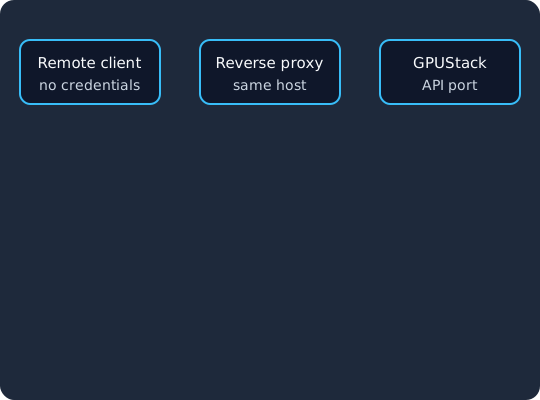
A remote client with no credentials reaches the reverse proxy (1), which forwards the request to GPUStack on 127.0.0.1, so GPUStack sees a loopback peer (2). Before 2.2.0 that request runs as the built-in admin (3), while 2.2.0 and later ignore the source address and refuse a request without a valid credential (4).
Either path gives “full, unauthenticated administrative access over the network”. The advisory lists what that means: enumerate and modify users, models, workers and configuration, “mint persistent admin API keys (scope ["*"], valid from any source IP thereafter)”, and read worker credentials and cloud and provider secrets. Combined with the admin-only POST /v2/inference-backends/from-yaml endpoint, it leads to code execution on worker hosts (GHSA-gj9m-f8ph-pmhr). An inference backend is the runtime GPUStack starts on a worker to serve a model, so being able to define one from YAML means being able to choose what runs on your GPU machines.
The advisory names the root cause as trusting the network source of a request, either the socket peer or a header the client controls, as an authentication signal. The advisory says the fix in 2.2.0 removed “the loopback auto-admin path” and hardened “client-IP / forwarding-header handling” (GHSA-gj9m-f8ph-pmhr). GPUStack’s CLI reference now describes the flag as “(Deprecated, no-op) Localhost callers are always authenticated”.
Is CVE-2026-102895 being exploited?
Yes. The advisory says the flaw “has been observed exploited in the wild against a v2.1.1 deployment”, where the attackers created custom backends that ran reverse shells, and it credits Javier Sixto of ulex.fr with reporting that (GHSA-gj9m-f8ph-pmhr). CISA added it to the Known Exploited Vulnerabilities catalog on 9 November 2026 with a due date of 12 November 2026 and marked it for forensic triage (CISA KEV feed). The NVD API record carries CISA’s assessment that exploitation is active, automatable and has total technical impact.
The dates matter for your own timeline. The fix shipped in 2.2.0 on 18 June 2026 (release record), the advisory followed on 31 July 2026, and the CVE was published on 4 November 2026 (CVE record). A server that stayed below 2.2.0 until this month was exposed for months after the fix existed, so the window you audit runs from when the server first became reachable until the day you upgraded.
Am I affected?
You are affected if any GPUStack server you run is below 2.2.0 and something other than the server itself can reach its API port. Check every server, including test clusters that someone set up for a demo.
-
Read the installed version. GPUStack is the
gpustackPython package, so ask Python for its version withimportlib.metadata.version()in the environment that runs the server. For a Docker install, run the first command and replace thegpustackafterdocker execwith your container’s name; the second command is the fallback for a server installed directly on the host.docker exec gpustack python -c "import importlib.metadata as m; print(m.version('gpustack'))" # or, for a server installed on the host: python -c "import importlib.metadata as m; print(m.version('gpustack'))" -
Look at what sits in front of it. If a reverse proxy on the same machine forwards to 127.0.0.1, every request it passes was treated as admin on a vulnerable version. If clients reach GPUStack directly, the forged header path still applies.
-
List the ports that answer from outside. GPUStack’s requirements page lists the server’s UI and API on TCP 80 and 443, the internal API on 30080, server metrics on 10161 and the embedded PostgreSQL on 5432, and TCP 10150 as the “Default port for GPUStack worker”. On the host,
ss -tlnplists the listening TCP sockets and the processes using them, so you can read the address each port is bound to, and a scan from outside your network shows which ones your firewall actually lets through.
What should you do right now?
Work in this order. The first two steps close the hole, and the rest deal with anything that may already have gone through it.
-
Upgrade. The advisory says “Upgrade to
2.2.0or later” (GHSA-gj9m-f8ph-pmhr). We would go to the latest release rather than stopping at 2.2.0, because the 2.2.2 release notes (release record) fix two more issues, missing authorization on several cluster and resource endpoints in 2.2.0 and 2.2.1, and a SAML callback that trusted an unverifiedSAMLResponsefrom 0.7.1 to 2.2.1. -
If you cannot upgrade today, use the advisory’s workarounds. Set
force_auth_localhost=true(the--force-auth-localhostflag ofgpustack start), make sure the proxy cannot make external traffic look like loopback, strip any client-suppliedX-GPUStack-Real-IPheader at the edge, and keep the API off untrusted networks behind a VPN or edge authentication (GHSA-gj9m-f8ph-pmhr). The nginx documentation forproxy_set_headersays “If the value of a header field is an empty string then this field will not be passed to a proxied server” (nginx proxy module). The snippet below is our own sketch, so test it against your setup:location / { proxy_pass http://127.0.0.1:80; # 80 is the default --port # Drop any client-supplied value before it reaches GPUStack proxy_set_header X-GPUStack-Real-IP ""; }Stripping the header does not help with the first trigger, because the proxy itself is the loopback peer, so on a vulnerable version the
force_auth_localhost=truesetting is the part that matters. -
Preserve evidence before you clean up. CISA flags this entry for forensic triage (CISA KEV feed), so copy the reverse proxy access logs, the GPUStack server logs and a backup of its database before you delete anything.
-
Audit, then rotate, as the next two sections describe.
Why does patching not remove an attacker’s access?
The upgrade removes the code path that made a loopback request an admin, and that is all it changes. Anything an attacker created while they were admin is ordinary data in GPUStack’s database, and the new version has no reason to distrust it. The advisory says the admin API keys an attacker could mint carry scope ["*"] and stay “valid from any source IP thereafter” (GHSA-gj9m-f8ph-pmhr), so a key created on 2.1.1 still opens the API on 2.3.1. The same applies to any user the attacker added or promoted, any backend they defined, and any secret they read, which works wherever it is valid until you change it at its source.
How do you audit admin users and API keys?
The bypass acted as the built-in administrator account, so start there and then widen to every admin.
- Review API keys. GPUStack’s API key management page says to “Navigate to the Access Control” menu and its “API Keys page”; do that while signed in as the built-in
adminaccount, and again as each other admin. Look for keys you cannot match to a person or a system, and pay most attention to keys with the “Platform Management” permission, which the same page says “Grants access to platform management endpoints (users, models, workers, etc.)”. Delete the unknown ones: the page says “Deleting a key normally is enough: the server tells the API gateway, and the key stops being accepted within seconds.” - Review users. The docs say to “Navigate to the
Userspage”; there, look for accounts you did not create and for any account with theAdminrole that should not have it (user management). The same page says “GPUStack has two user roles:AdminandUser”, so an unexpected admin is easy to spot. Deactivate or delete what you cannot explain, and change the password of the built-inadminaccount. - Review inference backends. The in-the-wild attack used custom backends running reverse shells (GHSA-gj9m-f8ph-pmhr), so list your custom backends and check each against what your team defined. Search your proxy access logs for
POSTrequests to/v2/inference-backends/from-yamlduring the exposure window. If you find a backend you did not create, treat every worker that ran it as compromised and rebuild it rather than cleaning it. - Review models, workers and settings. The advisory says an attacker could modify users, models, workers and configuration, so compare the cluster against what you expect: unknown workers, changed model sources and changed SSO or registry settings are all worth a closer look.
Which secrets should you rotate, and in what order?
Rotate after the server is upgraded and the audit is done, otherwise an attacker who still holds a key can read the new values. The advisory names worker credentials and cloud and provider secrets as readable (GHSA-gj9m-f8ph-pmhr), and GPUStack’s docs show where each one lives. We would go in this order, from the secrets that let someone add machines or spend money down to the ones that only read content:
- Cloud provider credentials. GPUStack stores cloud credentials to provision workers, and for a DigitalOcean access token its docs say “The token scope must be Full Access” (cloud credential management). Revoke each one at the provider, issue a new one, enter it in GPUStack, and check the provider’s own logs for machines you did not start.
- The worker registration token. The CLI reference lists
-t value, --token valuewith the description “Shared secret used to register worker.”, and for Kubernetes clusters the cluster management page says “gpustack-system also holds the bootstrap ConfigMap, ServiceAccount and the registration token Secret”. The docs we read do not describe a rotation procedure, so plan for setting a new token on the server and registering the workers again, and test that on a non-production cluster first. - Container registry credentials. Replace the default container registry username and password, which GPUStack’s environment variables page lists as
GPUSTACK_RUNTIME_DEPLOY_DEFAULT_CONTAINER_REGISTRY_USERNAME(“Username for the default container registry”, set “at the startup of every GPUStack worker”) andGPUSTACK_RUNTIME_DEPLOY_DEFAULT_CONTAINER_REGISTRY_PASSWORD, and the “Image Credentials” of Kubernetes clusters, which the docs describe as “image pull secrets used to pull GPUStack images from a private registry” (cluster management). A changed registry credential is how an attacker would swap the images your workers pull. - Model source tokens. Replace the Hugging Face token set with
--huggingface-token,HF_TOKENor a cluster’shuggingface_token(CLI reference), and any API keys for third-party model providers you configured in GPUStack. - The gateway signing key on Kubernetes. GPUStack’s API key management page edits the gateway’s key list with
kubectl -n higress-system edit wasmplugin gpustack-llm-ext-authand says “The same resource holds the key the gateway signs its internal identity tokens with”. If anything that ran during the window could read that namespace, ask GPUStack’s maintainers how to replace it. - SSO client secrets. If GPUStack signs users in through OIDC, its
--oidc-client-secretsits in the server’s configuration (SSO guide). The advisory does not say configuration values were readable, so this is our own precaution: regenerate the client secret in your identity provider and update the server. - Legitimate admin keys. Reissue the “Platform Management” keys your own automation uses if you cannot show they were not read, and delete the old ones.
Identity you do not have to patch yourself
Skycloak is a managed identity platform for SSO, MFA, SCIM and audit logs. When an advisory lands, the fix is ours to ship: Keycloak 26.7.2 closed an account takeover through password reset and customers had it the same day upstream published it.
How do you put the GPUStack console behind SSO with enforced MFA?
GPUStack supports OIDC, SAML and CAS sign-in natively, and its SSO guide says “Any authentication provider that supports OIDC can be configured”, so Keycloak can be the identity provider without a proxy in between. You set four options on the server: --oidc-issuer, --oidc-client-id, --oidc-client-secret and --oidc-redirect-uri, where the redirect URI is your GPUStack server URL followed by /auth/oidc/callback (or the matching GPUSTACK_OIDC_ environment variables). With Keycloak the issuer is your realm’s URL, ending in /realms/ and the realm name, as the issuer URL in our quickstart shows, and GPUStack finds the endpoints through the realm’s .well-known/openid-configuration document. We would use OIDC rather than SAML here, given the unverified SAML response issue fixed in 2.2.2.
gpustack start \
  --oidc-issuer https://auth.example.com/realms/ai-platform \
  --oidc-client-id gpustack \
  --oidc-client-secret "$GPUSTACK_OIDC_CLIENT_SECRET" \
  --oidc-redirect-uri https://gpustack.example.com/auth/oidc/callback \
  --external-auth-default-inactive
The --external-auth-default-inactive option makes new SSO users inactive until an admin turns them on (SSO guide), which stops anyone with an account in the realm from getting in by default. On the Keycloak side, require a second factor in the realm: enable the Configure OTP or WebAuthn Register required action, and bind a browser flow where the OTP or WebAuthn step is set to Required as the realm’s Browser flow, so that a dedicated realm for AI infrastructure consoles, like ai-platform in the example, requires the second factor for every sign-in to it, GPUStack included. Our MFA setup guide walks through the required actions and the browser flow steps.
Be clear about what this protects. SSO with MFA protects people signing in to the console, and it gives you one place to remove an engineer’s access. It does not protect API keys, which are bearer tokens that skip the sign-in page, and it does not change the password of the built-in admin account, so give that account a strong, rotated password. It would also not have stopped CVE-2026-102895, which skipped authentication altogether. Keeping the console and API on a private network or behind a VPN, as the advisory recommends, is the control that limits who can try a bypass at all, and for apps without OIDC support our guide to putting Keycloak in front of internal apps with oauth2-proxy shows the proxy pattern. If you do put a proxy in front of GPUStack, upgrade first, because a same-host proxy is exactly the first trigger of this CVE on old versions.
How do you watch for new admin keys and logins?
Once the cluster is clean, keep it that way by watching the two things this attack created. Review the API Keys and Users pages on a schedule, and alert on proxy log entries for POST requests that create backends or keys outside a change window. With Keycloak as the identity provider, sign-ins to the GPUStack client show up as Keycloak login events, which you can store and forward as our Keycloak auditing and event logging guide explains, so an admin sign-in at an odd hour or from a new location is visible in the same place as the rest of your logins.
What does this mean for AI infrastructure more broadly?
GPUStack is not the first AI server we have covered after a KEV listing: CISA added the LiteLLM MCP bypass we covered in CVE-2026-59822 to the catalog on 2 September 2026 (NVD API record). In both cases the server held credentials for other systems (upstream provider keys and MCP server credentials there, cloud and registry credentials here), and our advice in both posts is to rotate those credentials after the patch. The Aruba AOS authentication bypasses we covered on network devices called for the same kind of secret rotation after the patch. Treat any model server or AI gateway as a credential store: keep it off the internet, sign people in through your identity provider with MFA, and know which secrets it holds before you need to rotate them.
Frequently asked questions
Which GPUStack versions are affected by CVE-2026-102895?
Every gpustack version before 2.2.0 (GHSA-gj9m-f8ph-pmhr; NVD). The fix is in 2.2.0, and the latest release at the time of writing is 2.3.1.
Is CVE-2026-102895 in CISA’s KEV catalog?
Yes. CISA added it as “GPUStack Improper Authentication Vulnerability” on 9 November 2026, with a due date of 12 November 2026 (CISA KEV feed), and the vendor advisory reports exploitation against a 2.1.1 deployment.
Am I safe if I never used a reverse proxy?
No. The second trigger is a forged X-GPUStack-Real-IP: 127.0.0.1 header, which a client can send directly to the API (GHSA-gj9m-f8ph-pmhr). Any version before 2.2.0 that a remote client can reach is exposed.
Does setting force_auth_localhost still matter after I upgrade?
No. From 2.2.0 the loopback auto-admin path is gone, and the CLI reference lists --force-auth-localhost as a deprecated no-op. It only matters as a stopgap on a version you cannot upgrade yet.
Does upgrading remove API keys an attacker created?
No. The keys are stored data, and the advisory says keys minted through the bypass have scope ["*"] and stay valid from any source IP (GHSA-gj9m-f8ph-pmhr). Review and delete unknown keys on the API Keys page after you upgrade.
Can GPUStack use Keycloak for single sign-on?
Yes, through OIDC. GPUStack’s SSO guide supports any OIDC provider through the --oidc-issuer, --oidc-client-id, --oidc-client-secret and --oidc-redirect-uri options, and MFA is then enforced by the browser flow of the Keycloak realm that signs users in.
Update log
- 16 November 2026: First published, checked against GHSA-gj9m-f8ph-pmhr, the NVD API record, the CVE record, the CISA KEV feed and GPUStack’s releases. The advisory lists no specific indicators of compromise beyond attacker-created custom backends; we will add any that GPUStack or CISA publish.
What to do next
Check the version of every GPUStack server you run today, upgrade to the latest release, and take the API off the public internet. Then work through the audit of admin users, API keys and custom backends, rotate the cloud, worker, registry and model source secrets in the order above, and move console sign-in to Keycloak with MFA required across the realm that signs users in to GPUStack. If you would rather not run that Keycloak yourself, Skycloak hosts and operates it for you.
Sources
- GPUStack, GitHub Security Advisory GHSA-gj9m-f8ph-pmhr, published 31 July 2026, checked 16 November 2026
- NIST National Vulnerability Database, CVE-2026-102895 and its API record, checked 16 November 2026
- CVE Program, CVE-2026-102895 record, checked 16 November 2026
- CISA, Known Exploited Vulnerabilities Catalog and its JSON feed, entry added 9 November 2026
- GPUStack, pull request 5346 and the releases v2.2.0, v2.2.2 and v2.3.1 on GitHub
- GPUStack documentation: CLI reference, SSO, API key management, user management, cluster management, cloud credential management, environment variables and requirements, checked 16 November 2026
- Keycloak, Server Administration Guide
- nginx, proxy_set_header documentation
- Python Software Foundation, importlib.metadata documentation
- Linux man-pages, ss(8)