
authentik is an open-source identity provider, written mainly in Python on Django and released under the MIT license with a separately licensed Enterprise part, that gives your applications single sign-on, multi-factor authentication and a forward-auth proxy over OpenID Connect, SAML, LDAP, SCIM, RADIUS and Kerberos. You run it yourself as a server, a worker and a PostgreSQL database, which suits homelabs and small to mid-sized teams well.
This guide is written against authentik 2026.8, the current version in the authentik documentation (the latest patch is 2026.8.5, released on 21 October 2026, per the GitHub releases page). It explains the handful of objects authentik is built from and how they connect, what running it yourself involves, what the free edition covers compared with Enterprise, and when Keycloak is the better fit.
What is authentik, in one paragraph?
The project describes itself as “an IdP (Identity Provider) and SSO (Single Sign-On) platform that is built with security at the forefront of every piece of code and every feature, with an emphasis on flexibility and versatility” (authentik docs). An identity provider is the one place your users sign in, and single sign-on means every connected application trusts that sign-in instead of keeping its own passwords. The GitHub README puts the scope more concretely: authentik “supports SAML, OAuth2/OIDC, LDAP, RADIUS, and more, designed for self-hosting from small labs to large production clusters” (goauthentik/authentik on GitHub). The repository has about 26,000 stars as of October 2026 (GitHub), and the project’s home page claims “over 1 million installations” (goauthentik.io).
Under the hood, the core is a Django 5.2 application on Python 3.14 (pyproject.toml), with most of the rest in TypeScript and smaller parts in Go and Rust (GitHub language breakdown). The license file puts everything under the MIT license except the authentik/enterprise/ directory, which has its own license, and the documentation website, which is CC BY-SA 4.0.
Who is authentik for?
People usually meet authentik in self-hosting communities, where the typical problem is a dozen web apps on one server, each with its own login. authentik fits that case well because it can put a sign-in in front of apps that support OpenID Connect or SAML and, through its proxy, in front of apps that support no login protocol at all. It also fits small and mid-sized companies that want workforce SSO for tools such as Grafana, GitLab or a wiki without a per-user cloud bill, since the free edition lists “Covers B2B and B2C use cases” among its features (authentik pricing).
It fits less well when you need published capacity numbers for a large customer-facing login, or when your team wants to write deep custom extensions in Java. Those cases are where Keycloak tends to win, and the decision box near the end covers them.
How authentik works: applications, providers, flows, stages, policies, outposts and blueprints
Most confusion about authentik comes from its vocabulary, so it helps to learn the seven objects and how they connect before you install anything.
| Object | What it is, in the docs’ words | What you use it for |
|---|---|---|
| Application | Used “to configure and separate the authorization/access control and the appearance of a specific software application” (Applications) | One per app you protect; it decides who sees the app on the user dashboard |
| Provider | “An authentication method, a service that is used by authentik to authenticate the user for the associated application” (Providers) | The protocol the app speaks: OAuth2/OIDC, SAML, LDAP, Proxy, RADIUS, SCIM and others |
| Flow | “A method of describing a sequence of stages” (Flows) | The steps of signing in, enrolling, recovering a password or signing out |
| Stage | “A single verification or logic step” (Flows) | One step inside a flow, such as identification, password or MFA |
| Policy | Rules that decide “if the current user is allowed to see and use this flow”, and that are evaluated before a stage is shown (Flows) | Conditional access: skip MFA on the office network, or block a group from an app |
| Outpost | “A single deployment of an authentik component, essentially a service, that can be deployed anywhere that allows for a connection to the authentik API” (Outposts) | Runs the LDAP, Proxy, RADIUS and remote access providers close to the apps |
| Blueprint | A way “to template, automate, and distribute authentik configuration” in YAML (Blueprints) | Keeping your configuration in Git and applying it on startup |
The relationship between the first two is usually one to one: each application has one main provider, and the docs note that applications “can, however, use specific, additional providers to augment the functionality of the main provider”, which authentik calls backchannel providers (Applications). An application shows up on a user’s dashboard when the user passes its policies, or when it has no policies bound, and when it has a launch URL (Applications). That dashboard is a real feature for internal teams, because it gives everyone one page with exactly the tools they are allowed to open.
Flows are where authentik differs most from other identity providers. Each flow has a designation that says what it is for: authentication, authorization, enrollment, invalidation, recovery, stage configuration or unenrollment (Flows). Policies bound to stages are evaluated “right before the stage is presented to the user” (Flows), so you can build a login that asks for MFA only when a condition holds. When your conditions outgrow the built-in policy types, expression policies let you write the rule in Python.
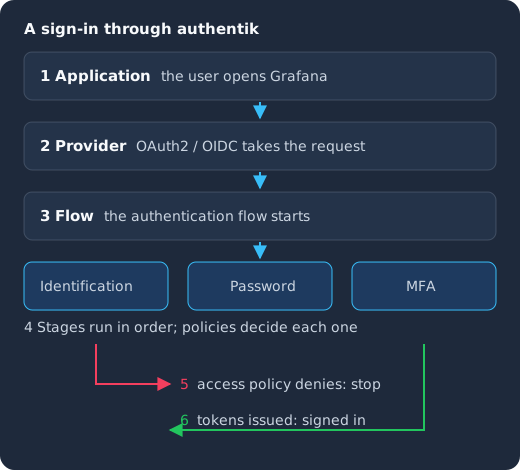
The user opens an application (1), its OAuth2 provider takes the request (2) and starts the authentication flow (3), which runs the identification, password and MFA stages in order while policies decide each one (4). An access policy can stop the sign-in (5); otherwise the provider issues tokens and the user is in (6).
Where protocol support needs per-application work
A provider being on the list does not mean every app works with one click. For OpenID Connect and SAML you still create one provider per application and copy its client ID, redirect URLs or SAML metadata into that application’s own settings, and the details differ from app to app. authentik keeps a separate catalog of integration guides for this, and describes an integration as “how authentik connects to third-party applications, directories, and other identity providers”. Check that your important apps have a guide there before you commit, because an app with an unusual SAML setup is where most of your time will go.
Apps with no login protocol at all go through the Proxy provider, which “protects applications that do not support native authentication protocols such as OIDC, SAML, or LDAP” (Proxy provider). It has three modes: a full proxy to one upstream app, forward auth for a single application behind your existing reverse proxy, and forward auth at the domain level, where one provider protects many apps under the same parent domain (Proxy provider). Forward auth means your reverse proxy asks authentik “is this request signed in?” before passing it on, and the docs have configuration guides for Caddy, Envoy, HAProxy, nginx and Traefik (Proxy provider).
What does authentik run on?
A current authentik install has three parts. The server runs the core, which handles “most of authentik’s logic, such as API requests, flow executions, any kind of SSO requests”, plus an embedded outpost so you can use Proxy providers without deploying a separate one (Architecture). The worker “executes background tasks, such as sending emails, the event notification system” and the scheduled system tasks (Architecture). PostgreSQL stores “all of its configuration and other data (excluding uploaded files)” (Architecture).
Older tutorials also list Redis, but that is out of date. The 2025.10 release notes say “authentik no longer uses Redis at all”, because caching, the embedded outpost and WebSocket traffic moved to PostgreSQL after tasks had already moved in 2025.8 (authentik 2025.10 release notes). The same notes warn that authentik will use “roughly 50% more database connections to Postgres”, which matters if you share a database server with other apps.
For Docker Compose, the minimum is “a host with at least 2 CPU cores and 2 GB of RAM” (Docker Compose installation). Kubernetes is the other supported install path (authentik docs), and the Installation and Configuration section covers reverse proxies, email, high availability and air-gapped setups.
Identity management as a service, on open source
Skycloak is a managed identity platform in the same category as Auth0 or Okta, built on real upstream Keycloak. You get SSO, MFA, SCIM and audit logs without running the servers, and you can export and self-host whenever you want.
What does self-hosting authentik involve?
Installing authentik takes an afternoon, but keeping it healthy is ongoing work that falls on you. Here is what the documentation asks of you, in practice.
- Upgrades in order. “Upgrades must follow the sequence of major releases; do not skip directly from an older major version to the most recent version” (Upgrade authentik). If you fall several releases behind, you step through each one.
- No way back. “authentik does not support downgrading”, so the docs tell you to back up PostgreSQL before every upgrade (Upgrade authentik).
- Backups of more than the database. PostgreSQL holds the users, policies, flows and configuration, but you also need
/datafor icons and uploaded files unless you use S3,/certsif certificates live on disk,/custom-templatesif you changed the UI, and/blueprintsif you wrote your own (Backup and restore). - High availability that leans on PostgreSQL. “Multiple instances of the server and worker can be run in parallel”, and because “all session state and configuration data is stored in the database”, you scale by adding instances (High availability). That makes PostgreSQL the piece whose availability you have to design, and the docs point you to PostgreSQL’s own options for that.
- Your own capacity testing. The high availability page gives no sizing numbers (High availability), so beyond the 2 CPU and 2 GB minimum you load-test your own login rate.
None of this is unusual for a self-hosted identity provider, and Keycloak asks for similar discipline. If you are weighing the general question of running identity yourself, our post on whether self-hosting Keycloak is worth it walks through the same trade-offs, and most of them apply to authentik too.
What is free in authentik, and what needs Enterprise?
authentik comes in “the forever-free open source project upon which everything is built, and our source available Enterprise version, with a Support center and additional features” (authentik docs). Enterprise “uses the same container images and upgrade process as the open source version”, and you turn its features on by installing a license key, which is validated locally so it also works air-gapped (authentik Enterprise). Everything in the table comes from the authentik pricing page as of October 2026.
| Open source | Enterprise | Enterprise Plus | |
|---|---|---|---|
| Price | Free | $5 per user per month, billed annually, plus $0.02 per external user per month; service accounts free | Starting at $20k annually |
| Protocols | OIDC, SAML, LDAP, SCIM, RADIUS, Kerberos and Proxy; OpenID Certified for OpenID Connect | Same, plus RADIUS EAP-TLS and client certificate (mTLS) authentication | Same as Enterprise |
| Notable features | Web-based RDP and SSH access, OAuth 2.0 token exchange, multi-account switching, custom attributes | Privileged access management, agent accounts for non-human identity, Google Workspace and Microsoft Entra ID integration, Chrome Enterprise device trust, enhanced audit logging, scheduled offboarding, Windows local device login | Multi-instance deployments, FIPS compliance for FedRAMP |
| Support | Community Discord, “No support” | Ticket-based support for subscriptions over $1k | Dedicated support and SLAs |
The free edition is generous for SSO itself: every protocol and the proxy are in it. What you pay for is mostly enterprise integration (syncing users into Google Workspace or Entra ID), compliance features and someone to call. If you need SCIM provisioning to your own apps, that is in the free list; provisioning into Google Workspace or Entra ID is Enterprise.
authentik or Keycloak: a short decision box
Keycloak is the other open-source identity provider people usually weigh against authentik. It is a Java project (current release 26.8.1, from 13 October 2026, per the Keycloak 26.8.1 release page), and our complete Keycloak guide explains how it works. This box gives the four questions that decide most cases; the full scorecard is in our Keycloak vs authentik comparison.
| If this matters most to you | Lean toward | Why |
|---|---|---|
| SSO in front of self-hosted apps that have no login protocol | authentik | The Proxy provider and forward auth are built in and free (Proxy provider) |
| Planning capacity for a known login rate | Keycloak | Keycloak publishes starting-point sizing figures: 1 vCPU per 15 password logins per second, 1 vCPU per 120 client-credential grants or refreshes per second, 150% extra CPU head-room and a base of 1250 MB of RAM per pod, which it asks you to confirm with your own load tests (Keycloak sizing guide); authentik’s HA page has no sizing figures |
| Custom extensions written by your team | Keycloak | Keycloak’s Server Developer Guide documents Java service provider interfaces for custom authenticators, user storage and event listeners; authentik’s main extension point is Python expression policies |
| A small stack and config as code from day one | authentik | Server, worker and PostgreSQL with no Redis since 2025.10 (release notes), and YAML blueprints built in |
Token exchange is no longer a deciding row on its own. Keycloak’s standard token exchange, which implements RFC 8693, is “the fully supported token exchange implementation” and is enabled by default (Keycloak token exchange), and authentik’s pricing page now lists “OAuth 2.0 token exchange” in the free edition (authentik pricing). If you depend on it, test the exact grant your services use on both.
If you are still choosing among more than two projects, our open-source authentication comparison for 2026 covers the wider field, and Keycloak vs Authelia is useful if forward auth for a homelab is your main need.
What to do next
Write down the three or four applications you most need to protect and the protocol each one speaks, then run them through the decision box. If authentik fits, pick the hardest of those apps, look for its guide in the integrations catalog, and get that one working end to end before you move the rest; plan your PostgreSQL backups and upgrade routine before you go live.
If Keycloak fits, the Keycloak Docker Compose generator gives you a production-shaped local stack in a few minutes, and how to run Keycloak behind a reverse proxy covers the part most first installs get wrong. If you would rather not operate Keycloak yourself at all, that is what we do: see managed Keycloak hosting.