

Keycloak is an open source identity and access management (IAM) server that handles authentication, authorization, and user management for applications and APIs. Instead of building login forms, MFA, social login, and password reset flows from scratch, you configure Keycloak once and your applications delegate every identity operation to it over OpenID Connect, OAuth 2.0, or SAML 2.0.
Originally developed by Red Hat (now part of IBM) and first released in 2014, Keycloak has become the most widely deployed open source IAM solution. It is a CNCF incubating project since April 2023 with more than 30,000 GitHub stars, and the current release is 26.8.0, shipped in October 2026 (release announcement). This guide covers what Keycloak does, how it works, its core features, architecture, common use cases, and, just as important, when you should not use it.
The Problem Keycloak Solves
Every application that has users needs to answer three questions:
- Who is this person? (Authentication)
- What are they allowed to do? (Authorization)
- How do we manage their identity lifecycle? (User Management)
Building these from scratch is a significant undertaking. You need:
- Secure password storage (hashing, salting)
- Login and registration forms
- Password reset flows
- Email verification
- Multi-factor authentication
- Social login (Google, GitHub, Apple, etc.)
- Session management
- Single sign-on across applications
- Enterprise federation (SAML, LDAP)
- Role-based access control
- Token issuance and validation
- Brute force protection
- Audit logging
Each of these is a project in itself. Together, they represent months of development work and ongoing security maintenance. Keycloak provides all of this out of the box.
How Keycloak Works
Strip everything else away and Keycloak is an authentication server. Your applications redirect users to Keycloak for login, Keycloak authenticates them, and then redirects them back to your application with a token that proves their identity and contains their permissions.
The Authentication Flow
Here is the typical flow for a web application using OpenID Connect:
- A user visits your application
- Your application detects they are not logged in
- Your application redirects the browser to Keycloak’s login page
- The user enters their credentials (or uses social login, MFA, etc.)
- Keycloak validates the credentials
- Keycloak redirects the browser back to your application with an authorization code
- Your application exchanges the code for an ID token, access token, and refresh token
- Your application uses the ID token to identify the user and the access token to authorize API calls
This is the OAuth 2.0 Authorization Code flow with PKCE, and it is the recommended pattern for web and mobile applications. For a detailed visual walkthrough, see our OAuth 2.0 developer’s visual guide and our OpenID Connect explained guide.
Keycloak’s Architecture
Keycloak runs as a standalone server (on Quarkus since version 17). Here are its main components:
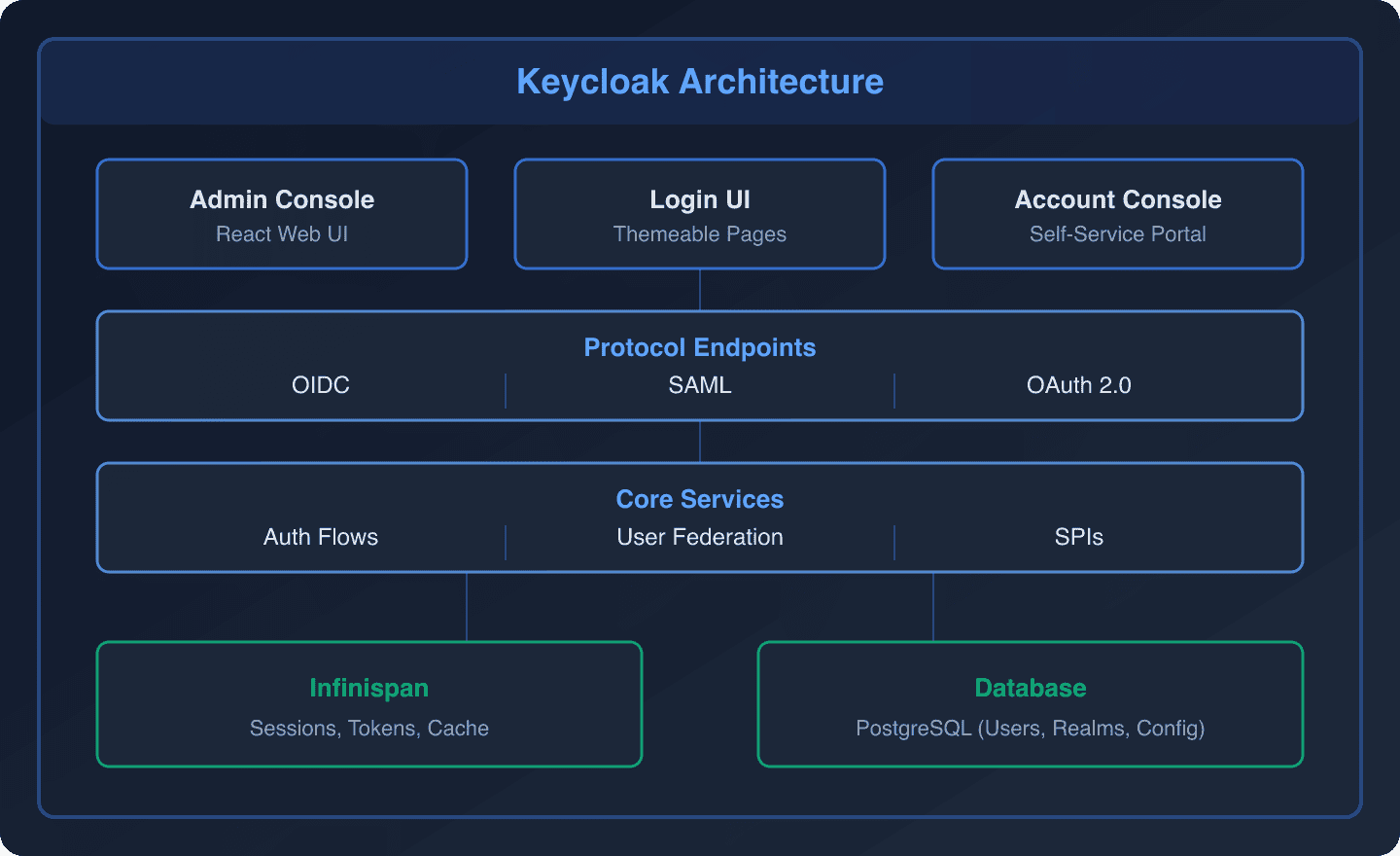
- Admin Console: React-based web UI for managing realms, clients, users, roles, and all configuration
- Login UI: Themeable pages for login, registration, password reset, and consent
- Account Console: Self-service portal where users manage their own profile, security settings, and sessions
- Protocol Endpoints: HTTP endpoints implementing OIDC, SAML, and OAuth 2.0 specifications
- Core Services: Authentication flows, user federation, event processing, and the Service Provider Interface (SPI) extension system
- Infinispan: In-memory cache for sessions, tokens, and frequently accessed data. Handles cluster communication in multi-node deployments. Keycloak 26.7 added a preview “stateless” mode for multi-cluster HA without an external Infinispan deployment
- Database: Persistent storage for users, realms, clients, roles, and all configuration
For production, Keycloak officially supports PostgreSQL (versions 14 through 18), MySQL, MariaDB, Microsoft SQL Server, Oracle, Amazon Aurora PostgreSQL, Azure SQL, and EnterpriseDB (supported databases). The embedded H2 database is for development only and must never be used in production. PostgreSQL is the most widely tested and recommended choice.
Core Features
Single Sign-On (SSO)
Single sign-on means a user logs in once and can access multiple applications without re-entering credentials. When a user authenticates with Keycloak, a session is created. Any application that trusts the same Keycloak realm can verify the session and grant access without another login prompt.
SSO works across protocol boundaries: a user who logs into an OIDC application can access a SAML application in the same realm without logging in again. This is critical for organizations with a mix of modern and legacy applications.
For understanding the differences between OIDC and SAML and when to use each, see our SAML vs OIDC comparison.
Multi-Factor Authentication (MFA)
Keycloak supports multiple MFA methods out of the box:
- TOTP: Time-based one-time passwords (Google Authenticator, Authy, any TOTP app)
- WebAuthn: Hardware security keys (YubiKey) and platform authenticators (Face ID, Touch ID, Windows Hello)
- Recovery Codes: Backup codes for account recovery
- Email OTP: One-time passwords sent via email
MFA can be required for all users, specific roles, or conditionally based on risk signals (new device, unusual IP, admin actions). See our guides on passwordless authentication with passkeys and email OTP with Keycloak.
Identity Providers and Social Login
Keycloak acts as an identity broker, federating authentication to external identity providers. This means your users can log in with:
Social providers: Google, GitHub, Facebook, Apple, Twitter, LinkedIn, Microsoft, and many more
Enterprise SAML IdPs: Active Directory Federation Services, Okta, Azure AD, PingFederate, OneLogin
OIDC providers: Any OIDC-compliant provider
When a user authenticates via an external provider, Keycloak creates a local user account and links it to the external identity. You can map attributes from the external provider to Keycloak user attributes using identity provider mappers.
For specific integration guides, see:
User Federation
User federation connects Keycloak to external user directories without migrating users. Keycloak can authenticate users against:
- LDAP: OpenLDAP, 389 Directory Server
- Active Directory: Microsoft AD, covered in the Keycloak Active Directory integration guide
- Custom sources: Any database or API via custom User Storage SPIs
When a federated user logs in, Keycloak validates their credentials against the external directory and imports their profile attributes. You can configure which attributes are synced and in which direction.
Role-Based Access Control (RBAC)
Keycloak provides a comprehensive RBAC system:
- Realm roles: Apply to all clients in a realm (e.g.,
admin,user) - Client roles: Scoped to a specific client (e.g.,
api-service:editor) - Composite roles: Roles that include other roles (e.g.,
adminincludeseditorandviewer) - Group roles: Assign roles to groups, and all group members inherit them
Roles are included in access tokens and can be checked in your application code. For authorization scenarios beyond RBAC, see our guide on Keycloak + OPA for fine-grained authorization.
User Management
The Admin Console provides comprehensive user management:
- Create, edit, delete users
- Set and reset passwords
- Manage user attributes (custom fields)
- View and terminate user sessions
- Impersonate users (for support scenarios)
- Manage required actions (force password change, email verification, etc.)
For automated user provisioning, Keycloak has a native SCIM 2.0 API: a preview feature in 26.7, and supported and enabled by default from Keycloak 26.8, with a per-realm toggle (release notes). Earlier versions required community extensions for SCIM support. With it enabled, external systems can create, update, and deactivate users in Keycloak programmatically. Test your integration with the SCIM Endpoint Tester.
Audit Logging
Keycloak logs every authentication event and administrative action. Event logs capture:
- User logins (successful and failed)
- Registration events
- Password changes
- Admin operations (user creation, role assignment, client modification)
- Token issuance and refresh
Events can be stored in the database, sent to external systems via the Event Listener SPI, or streamed to SIEM solutions. See our guides on auditing best practices and forwarding events to webhooks.
Session Management
Keycloak’s session management provides visibility and control over active sessions:
- View all active sessions per user
- Terminate individual sessions or all sessions for a user
- Configure session timeouts (idle, max, remember me)
- Support for session limits (max concurrent sessions per user)
Since Keycloak 26.0, user and client sessions are persisted in the database by default, so sessions survive a restart of all Keycloak nodes.
Branding and Theming
The login pages, registration forms, and email templates can all be customized with Keycloak themes. Themes use Freemarker templates (or React via Keycloakify) and support:
- Custom CSS and JavaScript
- Custom HTML templates
- Internationalization (i18n)
- Per-realm or per-client theme selection
Admin REST API
Everything you can do in the Admin Console can also be done via the Admin REST API. This enables:
- Automated user provisioning
- CI/CD pipeline integration
- Custom admin tools
- Infrastructure as code (see our Terraform guide)
Keycloak 26.7 also introduced an experimental Admin API v2, a ground-up redesign of the admin interface that will evolve over upcoming releases.
Service Provider Interfaces (SPIs)
Keycloak’s SPI architecture is what makes it truly extensible. SPIs allow you to replace or extend almost any behavior:
- Authentication SPI: Custom authentication mechanisms (biometrics, SMS OTP, custom protocols)
- User Storage SPI: Connect to custom user databases
- Event Listener SPI: Process events in custom ways (webhooks, analytics)
- Protocol Mapper SPI: Custom token claims
- Theme SPI: Custom theme resources
SPIs are written in Java and deployed as JAR files. See our guide on Keycloak event streaming and webhooks for a practical SPI example.
Organizations (Multi-Tenancy)
Keycloak’s Organizations feature shipped as a preview in version 25.0 and became a fully supported feature in Keycloak 26.0 (release notes). Organizations allow you to:
- Group users by organization
- Assign organization-specific roles
- Configure organization-specific identity providers
- Manage organization membership and invitations
Keycloak 26.7 added fine-grained admin permissions for organizations, so you can delegate administration of a single organization without handing out realm-wide admin rights. This is essential for B2B SaaS applications. For a deep dive, see our guide on multitenancy in Keycloak using the Organizations feature.
Protocol Support
OpenID Connect (OIDC)
OIDC is the recommended protocol for modern applications. Keycloak supports:
- Authorization Code flow (with PKCE)
- Client Credentials flow (service-to-service)
- Device Authorization flow (IoT devices)
- Token Exchange
- Backchannel Logout
- Dynamic Client Registration
- Discovery (
.well-known/openid-configuration) - DPoP (Demonstrating Proof-of-Possession)
- OpenID for Verifiable Credentials (OID4VC), promoted to preview in 26.1
SAML 2.0
For enterprise federation, Keycloak provides complete SAML support:
- SP-initiated and IdP-initiated SSO
- SAML assertion signing and encryption
- Single Logout (SLO)
- Attribute mapping
- NameID format configuration
- Step-up authentication for SAML clients (added in 26.7)
See our SAML configuration guides for detailed setup instructions. Use the SAML Decoder to inspect SAML assertions during integration.
OAuth 2.0
Keycloak implements the full OAuth 2.0 specification including:
- All standard grant types
- Token introspection
- Token revocation
- Resource indicators
- Rich Authorization Requests
For upcoming changes, see our post on OAuth 2.1: what you need to know.
Use Cases by Company Size
Startups and Small Teams
For small teams, Keycloak eliminates the need to build authentication from scratch. Common setup:
- Single realm, single Keycloak instance
- OIDC for SPA and mobile apps
- Google/GitHub social login
- Basic RBAC (admin, user roles)
- Managed hosting to avoid ops overhead
Mid-Size Companies
As organizations grow, they need:
- Multiple realms (per environment or per product line)
- SAML integration for enterprise customers
- MFA enforcement
- Audit logging for compliance
- User provisioning with SCIM
- Clustered deployment for availability
Enterprise
Large enterprises use Keycloak’s full feature set:
- User federation with Active Directory/LDAP
- Multi-region deployment
- Custom SPIs for specialized requirements
- Fine-grained authorization policies
- Comprehensive audit trails
- Integration with SIEM systems
- Custom themes matching corporate branding
Keycloak vs Commercial Alternatives
| Feature | Keycloak | Auth0 | Okta | Azure AD B2C |
|---|---|---|---|---|
| License | Apache 2.0 (free) | Proprietary | Proprietary | Proprietary |
| Pricing | Free + hosting costs | Per MAU | Per MAU | Per authentication |
| Self-hostable | Yes | No | No | No |
| SAML | Full | Enterprise plan | Full | Full |
| LDAP Federation | Built-in | Enterprise plan | Built-in | Via Azure AD |
| Custom Auth Flows | Full (SPIs) | Actions (limited) | Workflows | Custom policies |
| Data Residency | You control it | Limited regions | Limited regions | Azure regions |
| Open Source | Yes | No | No | No |
For detailed comparisons with specific providers:
- Auth0 alternatives
- Okta alternatives
- Cognito alternatives
- Supabase or Keycloak: a complete guide for teams building Postgres-backed apps who are choosing between Supabase Auth and Keycloak
- Open-source authentication comparison 2026
When Keycloak is the wrong choice
Most guides skip this part. Keycloak is excellent software, but it is not the right answer for every team, and pretending otherwise helps nobody.
There is no SLA. Keycloak is a community project. If production breaks at 2 a.m., you have GitHub Discussions and your own debugging skills. Commercial support means a Red Hat build of Keycloak subscription, which is a separate (if closely related) product with its own release lifecycle.
The upgrade treadmill is real. Keycloak ships a new minor roughly every quarter, and releases regularly deprecate and remove functionality. Hostname v1 configuration, for example, was removed outright in 26.0 (release notes). Falling several versions behind makes each upgrade riskier, so most teams end up budgeting upgrade work four times a year.
Production HA is a project, not a checkbox. A resilient deployment needs at least two nodes behind a load balancer, an external database, and correctly tuned Infinispan caching for sessions and cluster communication. The 26.7 preview of multi-cluster HA without external Infinispan will eventually simplify this, but preview features are not production guidance.
Customizations are Java artifacts. Themes and SPI extensions are code you build, deploy, and regression-test against every new Keycloak version. A custom authenticator that worked on 26.0 is not guaranteed to compile, or behave the same way, on 26.7.
None of this is a reason to avoid Keycloak; it is the operational cost of owning your identity stack. If you want the feature set without the treadmill, managed hosting (that is what Skycloak does) or an RHBK subscription shifts the maintenance onto someone else’s calendar. Our guide to cloud identity management lays out how those delivery models compare on cost, data residency, and how hard each one is to leave. And if you have no self-hosting requirement at all, a SaaS provider from the comparison table above may genuinely be the better fit.
The Keycloak Ecosystem
Client Libraries
Keycloak provides and the community maintains client libraries for every major platform:
- JavaScript/TypeScript:
keycloak-js(official) - Java: Spring Security integration, Quarkus extension
- Python:
python-keycloak,authlib - Go:
gocloak - Node.js:
keycloak-connect(deprecated, use standard OIDC libraries) - .NET: Standard OIDC middleware
- Mobile: AppAuth libraries for iOS and Android (see our mobile OAuth guide)
Infrastructure Tools
- Terraform: Manage Keycloak configuration as code (see our Terraform guide)
- Helm Charts: Deploy on Kubernetes
- Docker: Official container images on
quay.io - Keycloakify: Build React-based Keycloak themes
Community
Keycloak has one of the largest open source IAM communities:
- More than 30,000 GitHub stars (CNCF)
- A CNCF incubating project since April 2023
- GitHub Discussions for community Q&A
- A new minor release roughly every quarter
Getting Started
The fastest path to a working Keycloak setup:
Option 1: Local Development (5 minutes)
docker run -d --name keycloak -p 8080:8080
  -e KC_BOOTSTRAP_ADMIN_USERNAME=admin
  -e KC_BOOTSTRAP_ADMIN_PASSWORD=admin
  quay.io/keycloak/keycloak:26.7 start-dev
Then follow our getting started guide for a complete walkthrough.
Option 2: Docker Compose (10 minutes)
Use the Docker Compose Generator to create a configuration with PostgreSQL, or see our Docker Compose guide for dev, staging, and production setups.
Option 3: Managed Hosting (2 minutes)
Skycloak provisions a production-ready Keycloak instance in minutes. No Docker, no database setup, no TLS configuration. You get a running Keycloak instance with a custom domain, automatic backups, and monitoring.
Option 4: Kubernetes (30 minutes)
For teams with Kubernetes infrastructure, see our guide on deploying Keycloak with ArgoCD.
Developer Tools
We maintain a set of free developer tools for working with Keycloak and identity protocols:
- JWT Token Analyzer – Decode and inspect JWT access tokens and ID tokens
- JWKS Verifier – Verify JWT signatures against a JWKS endpoint, entirely client-side
- SAML Decoder – Decode and analyze SAML assertions and requests
- Keycloak Config Generator – Generate Keycloak realm and client configurations
- Docker Compose Generator – Create Docker Compose files for Keycloak
- SCIM Endpoint Tester – Test SCIM 2.0 provisioning endpoints
- IAM ROI Calculator – Calculate the ROI of managed vs self-hosted IAM
Keycloak Version History
Keycloak follows a quarterly-ish release cadence:
| Version | Year | Notable Changes |
|---|---|---|
| 1.0 | 2014 | Initial release |
| 4.0 | 2018 | User-managed access (UMA) 2.0 |
| 17.0 | 2022 | Quarkus distribution (WildFly retired) |
| 21.0 | 2023 | Old admin console removed, new React console only |
| 24.0 | 2024 | Declarative user profile enabled by default |
| 25.0 | 2024 | Argon2 default password hashing, hostname v2, Organizations preview |
| 26.0 | 2024 | Organizations fully supported, persistent sessions by default, hostname v1 removed |
| 26.1 | 2025 | OpenID for Verifiable Credentials (OID4VC) promoted to preview |
| 26.7 | 2026 | SCIM API (preview), multi-cluster HA without external Infinispan (preview), Admin API v2 (experimental), SAML step-up authentication |
| 26.8 | 2026 | SCIM API supported and enabled by default, invite-user workflow step |
The current release is 26.8.0, published in October 2026. Full details for every release are in the official release notes. For our own coverage, see Keycloak 25 new features and Keycloak 26 migration steps.
Learning Path
If you are new to Keycloak, here is a structured path through our guides:
- Start here: Getting Started with Keycloak in 2026
- Understand the protocols: OAuth 2.0 visual guide and OpenID Connect explained
- Connect your application: React + OIDC or Spring Boot
- Production deployment: Docker Compose guide or Kubernetes with ArgoCD
- Security hardening: 8 default configurations to adjust and cluster best practices
- Advanced features: RBAC, MFA, SSO, SCIM
For the complete reference, the Keycloak documentation is the authoritative source.
Frequently asked questions
Is Keycloak an identity provider?
Yes. Keycloak is an identity provider (IdP): it authenticates users and issues OIDC tokens and SAML assertions that your applications trust. It can also act as an identity broker, delegating login to external IdPs like Google, Microsoft Entra ID, or Okta, while your applications only ever integrate with Keycloak.
What is the difference between Keycloak and Red Hat build of Keycloak?
Keycloak is the upstream community project. Red Hat build of Keycloak (RHBK) is Red Hat’s commercially supported distribution built from it, which replaced Red Hat Single Sign-On (RH-SSO 7.6 was the final release). Each RHBK major release, such as RHBK 26.x, carries a minimum two-year support lifecycle. Same core code, but only RHBK comes with an SLA.
What is the latest version of Keycloak?
As of October 2026, the latest release is Keycloak 26.8.0, which promoted the SCIM API to supported and enabled it by default. Minor releases ship roughly every quarter. The release before it, Keycloak 26.7.0 (July 9, 2026), added a preview SCIM API, preview multi-cluster HA without external Infinispan, an experimental Admin API v2, and SAML step-up authentication.
Is Keycloak hard to maintain in production?
Harder than a SaaS identity provider, far easier than building auth yourself. A single dev instance takes five minutes, but production means an HA cluster, an external database, quarterly upgrade work, and rebuilding any custom themes or SPIs against each new version. Teams that do not want that operational load use managed hosting or an RHBK subscription.
How many users can Keycloak handle?
More than you are likely to need: sizing depends on request rate, not registered user count. The official sizing guidance allocates 1 vCPU per 15 password logins per second, 1 vCPU per 120 client-credential grants per second, and 1 vCPU per 120 refresh-token requests per second, plus 150% headroom and roughly 1,250 MB of base memory per pod. Databases holding millions of users are common in production.
Is Keycloak free?
Yes. Keycloak is released under the Apache 2.0 license and is completely free to download, use, and modify, with no per-user fees or feature paywalls. You pay only for the infrastructure you run it on, or for a managed service like Skycloak that runs it for you.
Try Keycloak with Skycloak
If you want to experience Keycloak without setting up infrastructure, Skycloak is a managed Keycloak hosting service that handles deployment, scaling, monitoring, backups, and upgrades. You get a dedicated Keycloak instance with your own custom domain, enterprise SLA, and security best practices built in.
Visit our pricing page to see plans starting from small teams to enterprise deployments.