What Is an API Key? How It Works and When to Use OAuth. An API key is a secret string your app sends with each request so an API can identify the project and track usage. How keys work, and when to use OAuth instead.
An API key is a unique secret string that an application sends with each request, so the API can tell which project is calling, apply that project’s rate limits and track its usage. It identifies the app, not the person using it, so when you need scoped, expiring access on behalf of a user, or a credential that proves more than “I hold this string”, use OAuth instead.
Google Cloud’s documentation puts the first half plainly: API keys “let you associate a request with a project for billing and quota purposes”, and a standard key “doesn’t authenticate a principal” (Google Cloud, “Manage API keys”). In other words, the key tells the API whose bill and whose quota a call belongs to, but it says nothing about which human is behind it.
Here is what using one looks like, with the key kept in an environment variable rather than typed into the command:
curl "https://api.example.com/v1/forecast?city=Paris" \
  -H "X-API-Key: $WEATHER_API_KEY"
This post explains how the API checks that key, where to find yours in a provider’s dashboard, how to store, restrict and rotate keys, what to do when one leaks, and when an OAuth token is the better choice. It ends with the Keycloak way of giving a machine or an AI agent access to an API, which does not use API keys at all.
Key takeaways
- An API key identifies the calling project or app. It does not identify a user, and holding the key is all it takes to use it.
- Send it in a request header over HTTPS, never in the URL, and never ship it in browser or mobile code where anyone can read it (Google Cloud, “Best practices for managing API keys”).
- Restrict each key to the APIs and callers that need it, rotate it on a schedule, and revoke it at once if it leaks.
- OWASP’s API Security Top 10 says “API keys should not be used for user authentication” (OWASP API2:2023 Broken Authentication). For user access, use OAuth.
- Keycloak has no API key feature. Machine callers use a confidential client with a service account and the client credentials grant, which returns a short-lived access token.
What is an API key, in plain words?
An API (application programming interface) is the set of URLs a service exposes so other programs can use it, such as a weather service that returns a forecast for a city. When you sign up for that service, it gives you an API key: a long, random string that you send with every call. The service looks the key up, sees that it belongs to your project, and serves the request.
Most API keys are opaque, which means the string itself carries no readable data. It is only a reference to a record on the provider’s side, and that record says which project owns the key, which APIs it may call, how many calls per minute it is allowed, and whether it has been revoked. Because the API learns everything from that record, the provider can change a key’s limits or switch it off without you changing anything on your side.
API keys are popular because they are simple. You copy one string into your configuration, and every request works, with no sign-in flow, no token endpoint and no expiry to handle. That simplicity is also their weakness, which the rest of this post covers.
How does an API key work?
The client puts the key in a header, and the API checks it before doing any work. Header names vary by provider: many use a custom header such as X-API-Key, and Google’s APIs use x-goog-api-key (Google Cloud, “Use API keys to access APIs”). On the wire, the request from the opening looks like this:
GET /v1/forecast?city=Paris HTTP/1.1
Host: api.example.com
X-API-Key: your-api-key-here
On the server, the check is a lookup. A well-built API does not store the keys themselves, only a hash of each one, in the same way a sign-in system stores password hashes, so a copy of its database does not hand out working keys. When a request arrives, the API hashes the presented key, finds the matching record, and refuses the request if there is no match or the key is revoked. A minimal Node.js version looks like this:
import { createHash } from "node:crypto";

// keyStore maps the SHA-256 hash of each key to its record:
// { project: "acme-weather", revoked: false, allowedApis: ["forecast"] }
function checkApiKey(req, res, next) {
  const presented = req.get("X-API-Key");
  if (!presented) return res.status(401).json({ error: "missing API key" });

  const hash = createHash("sha256").update(presented).digest("hex");
  const record = keyStore.get(hash);
  if (!record || record.revoked) {
    return res.status(401).json({ error: "invalid API key" });
  }
  if (!record.allowedApis.includes("forecast")) {
    return res.status(403).json({ error: "key not allowed for this API" });
  }

  req.project = record.project; // used for rate limits and usage counts
  next();
}
Once the key is accepted, the API knows the project, so it can count the call against that project’s quota and bill, and slow it down when it goes over its rate limit. The HTTP standard says a 401 answer means the request “lacks valid authentication credentials”, and a 403 means the server “understood the request but refuses to fulfill it” (RFC 9110 section 15.5.2, section 15.5.4), which is why the example answers 401 for a missing or unknown key and 403 for a known key that is not allowed to call this API.
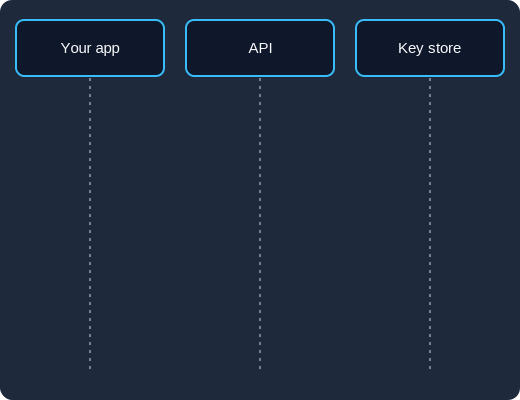
Your app sends the key in the X-API-Key header (1). The API hashes it and looks it up in its key store (2), which returns the project the key belongs to and its limits (3). The API answers 200 OK and counts the call against that project (4), while a request with an unknown or revoked key gets 401 Unauthorized (5).
Where do you find an API key?
You find an API key in the dashboard of the service that issues it, usually on a page called API keys, Credentials, Developer settings or Integrations, often under your account or project settings. You create the key there, give it a name that says what uses it, and copy it into your app’s configuration. Copy it straight into your secret store rather than into a chat or a notes file, and if you lose it, create a new key and delete the old one.
Google Cloud is a typical example. Its documentation says to go to the Credentials page in the Google Cloud console, click Create credentials, select API key from the menu, and add at least one API key restriction before you create the key (Google Cloud, “Manage API keys”).
If you are looking for a key that someone else on your team already created, check the secret manager or the deployment configuration your team uses before you create a new one. Two keys for the same app make it harder to tell later which one leaked and which one you can safely delete.
How do you keep an API key safe?
Anyone who holds an API key can use it, so keeping it safe comes down to keeping it out of places other people can read, limiting what it can do, and replacing it regularly.
Store it as a secret. Keep keys in a secret manager or in environment variables that your platform injects at run time, not in source code. Google’s guidance is direct: “API keys hardcoded in the source code or stored in a repository are open to interception or theft by bad actors” (Google Cloud, “Best practices for managing API keys”).
Send it in a header, never in the URL. Some APIs accept the key as a query parameter, such as ?key=..., but Google warns that this “includes your API key in the URL, exposing your key to theft through URL scans” (Google Cloud, “Use API keys to access APIs”). URLs end up in browser history and server logs, which is the same reason the OAuth bearer token standard says tokens “SHOULD NOT be passed in page URLs” (RFC 6750 section 5.3).
Keep it on the server. A key in JavaScript that runs in the browser, or inside a mobile app, can be read by anyone who opens the developer tools or unpacks the app. Google’s advice is that the client “should pass requests to the server, which can add the credential and issue the request” (Google Cloud, “Best practices for managing API keys”).
Scope it to the least it needs. Give each app and each environment its own key, and restrict each key to the APIs it calls and the callers that may use it. Google says “unrestricted API keys are insecure” and recommends “setting both API restrictions and application restrictions”, where application restrictions limit a key to specific websites, IP addresses or apps (Google Cloud, “Manage API keys”). A narrow key does much less damage when it leaks.
Rotate it on a schedule. Google’s recommendation is to “periodically create new API keys, update your applications to use the new API keys, and delete the old keys”, and to delete keys you no longer need (Google Cloud, “Best practices for managing API keys”). If your own API issues keys, let each project hold two active keys at once, so a client can switch to the new key before you revoke the old one without any downtime.
What should you do when an API key leaks?
Treat a leaked key as in use by someone else, even if you cannot see it yet. Work through these steps in order:
- Create a replacement key with the same restrictions, and deploy it to every app that used the old one.
- Revoke or delete the leaked key in the provider’s dashboard as soon as the replacement is live. If the leak is serious, revoke it first and accept a short outage.
- Remove the key from where it leaked, such as a commit, a log file or a support ticket. Deleting the file in a new commit is not enough, because the key stays in the repository’s history, and a public repository may already have been copied.
- Check the usage logs for calls you do not recognise, from unknown IP addresses or at unusual volumes, and for charges on your bill.
- Fix the cause, for example by moving the key out of frontend code or adding the configuration file to
.gitignore.
Identity management as a service, on open source
Skycloak is a managed identity platform in the same category as Auth0 or Okta, built on real upstream Keycloak. You get SSO, MFA, SCIM and audit logs without running the servers, and you can export and self-host whenever you want.
What are the common API key mistakes?
Most API key incidents come from a short list of habits:
- Committing keys to a repository, often in a
.envfile or a test script that was meant to stay local. - Shipping keys in frontend or mobile code, where any user can read them.
- Putting keys in URLs, where logs and browser history keep them.
- One key for everything, shared by every app and environment, so you cannot revoke it without breaking all of them.
- Unrestricted keys that can call every API the account has, when the app needs one.
- Keys that never change, because nobody planned how to rotate them.
- Using an API key to log users in. OWASP’s API Security Top 10 says “API keys should not be used for user authentication” and should only be used to authenticate API clients (OWASP API2:2023 Broken Authentication). Broken authentication is the second item on the list (OWASP API Security Top 10, 2023).
API key vs OAuth: which should you use?
Use an API key when the API only needs to know which project or app is calling, for example to count usage, apply rate limits or block anonymous traffic to public data. Use OAuth when the API must know which user the call is for, must limit what the caller can do with scopes, or must be able to rely on credentials that expire on their own.
OAuth 2.0 works differently from a key. The client asks an authorization server for an access token, which RFC 6749 section 1.4 defines as “a string representing an authorization issued to the client”, and adds that tokens “represent specific scopes and durations of access”. The client then sends that token to the API in an Authorization: Bearer header (RFC 6750).
| API key | OAuth access token | |
|---|---|---|
| Identifies | The project or app | The app, and the user when one is signed in |
| Lifetime | Until someone rotates or revokes it | Short, set by the authorization server |
| Limits on what it can do | Whatever the provider lets you restrict | Scopes, audience and the user’s roles |
| Who issues it | The API provider’s dashboard | An authorization server, such as Keycloak |
| Typical use | Public data, usage tracking, simple server-to-server calls | User data, delegated access, service-to-service calls with roles |
That table is a short summary. Our API key vs OAuth guide goes through the trade-offs in more depth, and our post on authentication vs authorization is a companion read.
How do machines and AI agents get API access with Keycloak?
Keycloak does not issue API keys. When a backend service, a scheduled job or an AI agent needs to call an API that Keycloak protects, you register it as a confidential client (a client that can keep a secret, as opposed to a browser or mobile app) and use its service account. Keycloak’s documentation says “each OIDC client has a built-in service account”, which you turn on by setting Client authentication to On and selecting Service account roles in the client’s settings, as the admin console labels them in Keycloak 26.x (Keycloak Server Administration Guide, “Using a service account”, source). You then give that service account only the roles the caller needs.
The caller exchanges its client credentials for an access token with the OAuth client credentials grant, which, in the words of RFC 6749 section 4.4, “MUST only be used by confidential clients”. Keycloak accepts the client ID and secret in an Authorization: Basic header or as form parameters (Keycloak Server Administration Guide, “Confidential client credentials”, source):
curl -X POST "https://keycloak.example.com/realms/my-realm/protocol/openid-connect/token" \
  -u "report-agent:$CLIENT_SECRET" \
  -d "grant_type=client_credentials"
Keycloak answers with a JSON document that holds the access_token, its token_type of Bearer and an expires_in lifetime in seconds, as the example response in the guide shows (Keycloak Server Administration Guide, “Using a service account”, source). The caller sends that token to the API, and when it expires, the caller asks for a new one. For the client credentials grant, RFC 6749 says “a refresh token SHOULD NOT be included” (RFC 6749 section 4.4.3), and Keycloak’s guide says that by default “No refresh token is returned” for a service account (Keycloak Server Administration Guide, “Using a service account”, source).
This gives you what an API key cannot. The token expires on its own, so a leaked token is useful only for a short time. The roles in the token come from the service account’s roles, which Keycloak intersects with the client’s role scope mappings (Keycloak Server Administration Guide, “Using a service account”, source), so the API can check what the caller may do rather than only who it is. The long-lived secret goes only to Keycloak, never to the API, and Keycloak’s signed JWT option “enables the client to authenticate without a shared secret” (Keycloak Server Administration Guide, “Confidential client credentials”, source). Keycloak can also rotate client secrets through a client policy, and once that policy is on it “supports up to two concurrently active secrets for each client”, with a separate expiration for the old secret, so callers can switch over without downtime (Keycloak Server Administration Guide, “Client Secret Rotation”, source).
For AI agents, give each agent its own client rather than sharing one, so you can see each agent’s calls in the logs and switch off one agent without touching the others. Our guide to machine-to-machine authentication with Keycloak walks through the client, roles, audience mapping and token validation step by step, our post on the client credentials flow with Node.js is another place to start, and our API authentication best practices cover where API keys still fit next to OAuth, mTLS and DPoP.
Frequently asked questions
Is an API key the same as a password?
No. A password proves that a person is who they say they are, while an API key identifies an app or project. Both are secrets and both must be kept out of code and logs, but an API key is meant to be used by software on every request, with no person typing it.
Is an API key the same as an access token?
No. An API key is usually long-lived and identifies a project, while an OAuth access token is issued by an authorization server for a short time and carries scopes, and often a user (RFC 6749 section 1.4). Both are bearer credentials in practice, since whoever holds one can use it.
Can I put an API key in my frontend code?
Only when the provider designs the key to be public and lets you restrict it, for example to your website’s address, and even then anyone can read and copy it. For any key that grants paid or private access, keep it on your server and have the frontend call your server instead (Google Cloud, “Best practices for managing API keys”).
Do API keys expire?
A typical API key stays valid until someone rotates or deletes it, so plan a rotation schedule instead of waiting for it to run out. An OAuth access token, by contrast, carries its own lifetime in the expires_in field of the token response, which the standard defines as “the lifetime in seconds of the access token” (RFC 6749 section 5.1).
Should an API key go in the header or the URL?
In a header. A key in the URL ends up in browser history, proxy logs and server logs, and Google warns that it exposes the key “to theft through URL scans” (Google Cloud, “Use API keys to access APIs”).
Next steps
Start by listing the API keys your apps use today: where each one is stored, which app and environment uses it, what it is allowed to call, and when it was last rotated. Move any key out of code and URLs, restrict each one to what it needs, and set a rotation date. Where an API needs to know the user, or where you want credentials that expire on their own, read our API key vs OAuth guide to choose, then follow the Keycloak machine-to-machine guide to try the client credentials flow yourself.
To read about running Keycloak with Skycloak, see Skycloak’s Keycloak hosting.
Sources
- Google Cloud, “Manage API keys”, https://cloud.google.com/docs/authentication/api-keys
- Google Cloud, “Use API keys to access APIs”, https://cloud.google.com/docs/authentication/api-keys-use
- Google Cloud, “Best practices for managing API keys”, https://cloud.google.com/docs/authentication/api-keys-best-practices
- OWASP, API Security Top 10 2023, https://owasp.org/API-Security/editions/2023/en/0x11-t10/
- OWASP, API2:2023 Broken Authentication, https://owasp.org/API-Security/editions/2023/en/0xa2-broken-authentication/
- IETF, RFC 6749, The OAuth 2.0 Authorization Framework, https://datatracker.ietf.org/doc/html/rfc6749
- IETF, RFC 6750, The OAuth 2.0 Authorization Framework: Bearer Token Usage, https://datatracker.ietf.org/doc/html/rfc6750
- IETF, RFC 9110, HTTP Semantics, https://www.rfc-editor.org/rfc/rfc9110.html
- Keycloak, Server Administration Guide, https://www.keycloak.org/docs/latest/server_admin/
- Keycloak, Server Administration Guide source for OIDC clients, https://github.com/keycloak/keycloak/tree/main/docs/documentation/server_admin/topics/clients/oidc