
An RSA key is a pair of large numbers: a private key that only its owner holds and a public key that anyone may have. Whatever one key transforms, only the other can undo. Identity providers use that property to sign tokens: Keycloak signs a JSON Web Token (JWT) with the realm’s active private key, with the algorithm its Default Signature Algorithm setting names, which the Keycloak server administration guide describes as “the default algorithm used to assign tokens for the realm”, and publishes the matching public key at a JSON Web Key Set (JWKS) endpoint.
Any service that receives the token can fetch that public key once and check the signature itself, without calling the identity provider for every request. This post follows the RS256 case, the RSA algorithm that RFC 7519 recommends JWT implementations support. If you have decoded an access token and seen "alg": "RS256" and a kid in its header, this post explains what those two fields point at. We start with the key pair and one worked example with small numbers, then follow the key into the token, the JWKS endpoint and a key rotation in a Keycloak realm.
Key takeaways
- An RSA key pair is a public key (n, e) and a private key (n, d). A signature is made with the private exponent and checked with the public one, as RFC 8017 section 5.2 defines: s = m^d mod n to sign, m = s^e mod n to verify.
RS256means “RSASSA-PKCS1-v1_5 using SHA-256”, and RFC 7518 requires “a key of size 2048 bits or larger” for it.- The public key travels as a JSON Web Key (JWK) with
kty,n,eand akid, inside a JWKS that Keycloak serves at/realms/{realm}/protocol/openid-connect/certs(Keycloak docs). - Keycloak keeps “a single active key pair at a time, but can have several passive keys as well”, which is what lets you rotate keys without breaking tokens that are still valid (Keycloak server administration guide).
What is an RSA key, in plain terms?
RSA is a public-key cryptosystem, which means every participant has two keys that are mathematically linked. RFC 8017 section 3.1 defines the public key as the modulus n and the public exponent e, and section 3.2 defines the private key, in its simplest form, as the same modulus n with a private exponent d. In the standard’s own words, the public key has “two components: n the RSA modulus, a positive integer; e the RSA public exponent, a positive integer”. The modulus is the product of two large primes that only the key’s owner ever knew. Finding those primes from n alone is the factoring problem, which Wikipedia’s RSA article says the security of RSA is related to, adding that “there are no published methods to defeat the system if a large enough key is used”.
The two exponents undo each other. If you raise a number to the power d modulo n, raising the result to the power e modulo n gives the original number back, and the same works in the other direction. That is the whole trick behind both RSA encryption and RSA signatures. For encryption, anyone uses the public key to scramble a message that only the private key can unscramble. For signatures, which is what identity providers care about, the owner uses the private key to produce a value that anyone with the public key can check, but that nobody without the private key could have produced.
When a provider talks about “its signing key”, it means one such pair. The private half stays on the server. The public half is published on purpose, because its whole job is to let other people verify what the server signed.
A worked example with small numbers
Real keys use numbers hundreds of digits long, but the arithmetic is the same at any size, so we can walk through it with numbers that fit in your head, using the textbook key pair from Wikipedia’s RSA example. Pick two primes, p = 61 and q = 53. Their product is the modulus, n = 3233. RFC 8017 section 3.2 then asks for a public exponent e and a private exponent d such that e times d leaves a remainder of 1 when divided by the least common multiple of (p - 1) and (q - 1), which here is 780. Choosing e = 17 gives d = 413. The public key is (3233, 17) and the private key is (3233, 413).
Now sign the number 65. RFC 8017 section 5.2.1 defines the signature primitive as s = m^d mod n, so the signature is 65 raised to the power 413, modulo 3233, which comes out to 588. To verify, section 5.2.2 says to compute m = s^e mod n: 588 raised to the power 17, modulo 3233, gives back 65. The verifier never needed d. If someone changes the signature by even one, to 589, the same check returns 2838 instead of 65, and the verifier rejects it. The key pair, 65 as the message and the lcm of 780 are the values of Wikipedia’s example, which uses them for encryption (65 encrypts to 2790 there); the three signing results below are our own arithmetic on that same pair, and any calculator that handles big integers will confirm them.
public key  (n, e) = (3233, 17)
private key (n, d) = (3233, 413)

sign    65^413 mod 3233 = 588
verify  588^17 mod 3233 = 65     (matches, accept)
tamper  589^17 mod 3233 = 2838   (does not match, reject)
Two things separate this toy from a real RS256 signature. First, the provider does not sign the token itself but a SHA-256 hash of it, so the “message” is always a fixed-size number no matter how long the token is. Second, the hash is padded to the size of the modulus with a fixed pattern before signing, which is what the “PKCS1-v1_5” in the algorithm name refers to. RFC 8017 section 8.2 defines RSASSA-PKCS1-v1_5 as combining the signing primitives “with the EMSA-PKCS1-v1_5 encoding method”, and section 9.2 spells out that encoding. The modular arithmetic underneath is exactly what you just did.
How does an RSA key sign a JWT?
A JWT, as the abstract of RFC 7519 puts it, is “a compact, URL-safe means of representing claims to be transferred between two parties”. In the signed form that identity providers issue, it is three base64url-encoded segments separated by dots: a header, a payload of claims and a signature. The header says how the token was signed, and the signature covers the first two segments exactly as they appear in the token.
A header from a Keycloak access token looks like this once decoded (the key ID is an illustrative value):
{
  "alg": "RS256",
  "typ": "JWT",
  "kid": "7zkfXe2m3YtZx0gN_KqAb4v0bR8gPZw6yJ1Fh0c9sVg"
}
The alg value is defined in RFC 7518 section 3.1, where RS256 means “RSASSA-PKCS1-v1_5 using SHA-256”. To produce the signature, the provider takes the header and payload segments and joins them with a dot: RFC 7515 section 5.1 defines this signing input as “ASCII(BASE64URL(UTF8(JWS Protected Header)) || ‘.’ || BASE64URL(JWS Payload))”. RSASSA-PKCS1-v1_5 then hashes that string with SHA-256, pads the hash and applies the private exponent exactly as in the small example (RFC 8017 section 8.2). The result, base64url-encoded, becomes the third segment. RFC 7518 section 3.3 adds a size rule: “A key of size 2048 bits or larger MUST be used with these algorithms.”
The kid, or key ID, is the pointer from the token to the public key that can verify it. RFC 7517 section 4.5 describes it as a parameter “used to match a specific key” and notes that it exists “to choose among a set of keys within a JWK Set during key rollover”. That last phrase is the reason rotation works, and we come back to it below.
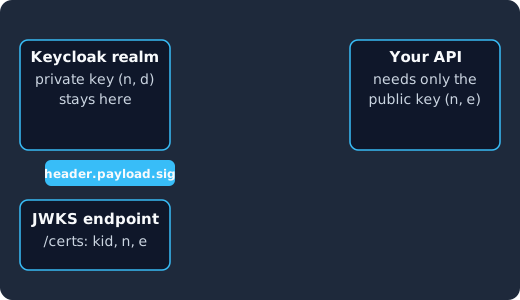
Keycloak hashes the token’s header and payload and signs the hash with the realm’s private key (1), the client carries the token to your API (2), your API reads the kid, fetches the matching public key from the JWKS endpoint (3) and checks the signature with it (4), so the private key never leaves the identity provider.
Where does the public key live? The JWKS endpoint
A JSON Web Key is, in the words of RFC 7517 section 2, “a JSON object that represents a cryptographic key”, and a JWK Set is “a JSON object that represents a set of JWKs” whose keys member is an array of them. For an RSA key, RFC 7518 section 6.3.1 names the two members that “MUST be present for RSA public keys”: n for the modulus and e for the exponent, each “represented as a Base64urlUInt-encoded value”. The private exponent is never in the published set.
Keycloak serves one set per realm. Its documentation describes the certificate endpoint, /realms/{realm-name}/protocol/openid-connect/certs, as returning “the public keys enabled by the realm, encoded as a JSON Web Key (JWK)” (Keycloak docs). The realm’s OpenID Connect discovery document lists the same address under jwks_uri, so libraries can find it from the issuer URL alone. A trimmed entry from such a set looks like this, with a placeholder modulus:
{
  "keys": [
    {
      "kid": "7zkfXe2m3YtZx0gN_KqAb4v0bR8gPZw6yJ1Fh0c9sVg",
      "kty": "RSA",
      "alg": "RS256",
      "use": "sig",
      "n": "REPLACE_WITH_THE_REALM_PUBLIC_MODULUS",
      "e": "AQAB"
    }
  ]
}
Each member has a defined meaning in RFC 7517 section 4. Section 4.1 says kty “identifies the cryptographic algorithm family used with the key, such as ‘RSA’ or ‘EC’”, section 4.2 gives use the values sig (signature) and enc (encryption), alg names the algorithm the key is meant for, and kid matches the token header. The e value AQAB is the encoding of the public exponent 65537: RFC 7518 section 6.3.1.2 uses exactly that value as its example and states that “the resulting representation for this value is ‘AQAB’”, and the example keys in RFC 7517 carry it too. We go deeper into the set format and its failure modes in JWKS explained.
Identity management as a service, on open source
Skycloak is a managed identity platform in the same category as Auth0 or Okta, built on real upstream Keycloak. You get SSO, MFA, SCIM and audit logs without running the servers, and you can export and self-host whenever you want.
How does a service verify a token with the public key?
Verification is the public half of the arithmetic from the worked example, wrapped in a few checks that the standards require. Keycloak’s guidance on validating access tokens says you can “lookup and cache the public key using the certificate endpoint with the Key ID (KID) embedded within the JWS”. In practice a library does this for you, so the steps below are what it does on your behalf:
- Split the token on its dots and decode the header. Read
algandkid. - Check that
algis one you accept. RFC 7519 section 7.2 lists, among its validation steps, verifying that the header “includes only parameters and values whose syntax and semantics are both understood and supported”. Pin the algorithm toRS256(or whichever your realm uses) rather than letting the token choose. - Find the JWK in the realm’s set whose
kidmatches. If none does, refresh the cached set once, because the realm may have added a key. - Build the public key from
nande, hash the header and payload segments with SHA-256, and check that applying the public exponent to the signature yields that padded hash. - Only then read the claims: the issuer (
iss) must be your realm, the audience (aud) must include your service, and the expiry (exp) must be in the future, as RFC 7519 section 4.1 defines those claims.
Here is the same sequence in Node.js with the jose library, which performs the JWKS fetch, the kid lookup and the signature check inside one call:
import { createRemoteJWKSet, jwtVerify } from "jose";

const issuer = "https://auth.example.com/realms/my-realm";
const jwks = createRemoteJWKSet(
  new URL(`${issuer}/protocol/openid-connect/certs`)
);

export async function verify(token) {
  const { payload } = await jwtVerify(token, jwks, {
    issuer,
    audience: "my-api",
    algorithms: ["RS256"],
  });
  return payload;
}
Nothing in this code talks to Keycloak per request. The jose documentation says the resolver “fetches the JSON Web Key Set when the cache is missing or stale”, so every later token is checked with local arithmetic. That is the practical reason providers sign with an asymmetric key: the verifier needs only the public half, and the public half can be given to everyone. Our guides on verifying a Keycloak access token on the backend and token validation for APIs cover the same check in other languages and frameworks.
Local verification does have a limit: it checks the signature and the claims, and nothing else. It does not ask Keycloak whether the token is still active, which is what token introspection exists for: RFC 7662 defines it as a way “to determine the active state of an OAuth 2.0 token and to determine meta-information about this token”. Keycloak’s validation guidance offers its introspection endpoint for that, noting that “the downside to this approach is that you have to make a network invocation to the Keycloak server”, and introspection versus local validation weighs the two.
RS256, HS256 and ES256: what changes with the algorithm?
The alg header can name other families than RSA, and the difference matters for how you distribute keys. RFC 7518 section 3.1 lists them with an implementation requirement for each. RFC 7519’s own section 8 is narrower: for JWTs, “only HMAC SHA-256 (‘HS256’) and ‘none’ MUST be implemented”, and it is “RECOMMENDED that implementations also support” RS256 and ES256.
| Algorithm | Meaning (RFC 7518) | Key the verifier needs | Requirement level |
|---|---|---|---|
HS256 |
HMAC using SHA-256 | The same secret the signer used | Required |
RS256 |
RSASSA-PKCS1-v1_5 using SHA-256 | The RSA public key only | Recommended |
PS256 |
RSASSA-PSS using SHA-256 and MGF1 with SHA-256 | The RSA public key only | Optional |
ES256 |
ECDSA using P-256 and SHA-256 | The elliptic curve public key only | Recommended+ |
HS256 is symmetric: whoever can verify a token can also mint one, because verification uses the same secret as signing. That is workable when one service issues and consumes its own tokens, but it is the wrong fit for an identity provider that hands tokens to many services, since every one of them would hold the power to forge tokens for the others. RS256, PS256 and ES256 are asymmetric, so a verifier holds only public material. The JWT best practices guide goes through the algorithm confusion attacks that follow from mixing these up.
Between the asymmetric options, PS256 is RSA with a probabilistic padding scheme. RFC 8017 section 8 says that “although no attacks are known against RSASSA-PKCS1-v1_5, in the interest of increased robustness, RSASSA-PSS is REQUIRED in new applications”, while RS256 remains the RSA option that RFC 7519 section 8 recommends JWT implementations support. ES256 uses elliptic curves instead of RSA; RFC 7518 section 3.4 notes that it gives equivalent security with shorter keys and smaller signatures. Keycloak lets a realm choose: the Tokens tab options in the server administration guide describe the Default Signature Algorithm option as “the default algorithm used to assign tokens for the realm”, and the guide’s realm keys section notes, in its procedure for adding a key from a Java keystore, that “the algorithm should match the key type (for example RS256 requires a RSA private key, ES256 a EC private key or AES an AES secret key)”. We are not recommending one here; the right choice depends on what your verifiers support, and the point for this post is that all three asymmetric options keep the private key on the provider.
Signed JWTs also run in the other direction. A confidential client can authenticate to Keycloak by signing a small JWT with its own private key and registering its public key or JWKS URL with the realm, which signed JWT client authentication describes. The key pair, the kid lookup and the verification are the same, only the roles swap.
Where do the keys live in Keycloak, and how do you rotate them?
The server administration guide’s section on configuring realm keys says that “when a realm is created, a key pair and a self-signed certificate is automatically generated”, and explains the model: “Keycloak has a single active key pair at a time, but can have several passive keys as well. The active key pair is used to create new signatures, while the passive key pair can be used to verify previous signatures.” Keys come from providers listed under Realm settings, Keys, Providers, and the guide says that “the selected active pair which is used for signatures is selected based on the first key provider sorted by priority that is able to provide an active key pair.” The provider the guide’s procedure for adding a generated key pair tells you to select is called rsa-generated.
Each key is in one of three states, and the JWKS endpoint reflects them. An active key signs new tokens. A passive key no longer signs but, in the guide’s words, “can be used to verify previous signatures”, so it stays published and tokens it signed keep verifying. A disabled key is out of the set, because the certificate endpoint “returns the public keys enabled by the realm” (Keycloak docs). Those states are what make a rotation safe: you add a new key, let it take over signing, and keep the old one passive until nothing it signed is still in circulation.
The rotation itself follows the guide’s procedures for adding a generated key pair, making keys passive and disabling keys:
- In the Admin Console, select the realm, open Realm settings, the Keys tab and then the Providers tab. Click Add provider and choose
rsa-generated. Give it a higher priority than the current signing provider, because the guide says “the highest number makes the key pair active”, pick the key size and save. From this moment new tokens carry the newkid: the guide’s rotation section says that “once new keys are available, all new tokens and cookies will be signed with the new keys”. - Open the old provider and toggle Active to Off, leaving Enabled on. The old key is now passive: it signs nothing but stays in the JWKS so tokens issued before the switch still verify.
- Wait for the old key’s tokens to expire. Keycloak’s rotation guidance is to “consider creating new keys every three to six months and deleting old keys one to two months after you create the new keys”, and it warns that “rotating keys also applies to offline tokens”, so applications holding those “need to refresh the tokens before the old keys are removed”.
- Open the old provider again and toggle Enabled to Off, or delete the provider. The key leaves the JWKS, and anything still signed with it is rejected from then on.
If you ever suspect the private key leaked, the guide’s section on compromised keys tells you to skip the overlap: “you should first generate new key pair as described above and then immediately remove the compromised key pair”, and then push a not-before revocation policy, which “ensures that client applications do not accept the existing tokens signed by the compromised key”.
On a Skycloak-managed cluster the realm’s keys are the same Keycloak keys, reached through the same Admin Console. Our cluster documentation describes Admin Console SSO, which “lets you access the Keycloak Admin Console directly using your Skycloak account, with no separate admin password to manage”, so you open the cluster in the dashboard, enter the Admin Console, select the realm and follow the four steps above. The JWKS address is the realm’s issuer URL followed by /protocol/openid-connect/certs, exactly as on any Keycloak.
Frequently asked questions
Is an RSA key the same as an SSH key or a TLS certificate?
They can be the same kind of key doing different jobs. An SSH key pair, a TLS certificate’s key pair and a Keycloak realm’s signing pair are all often RSA pairs with the structure RFC 8017 defines. What differs is the wrapper and the use: SSH stores the public key as a line in an authorized keys file, which the sshd manual describes as “the files containing public keys for public key authentication”; TLS wraps it in an X.509 certificate whose subject public key field, per RFC 5280, “is used to carry the public key”, signed by a certificate authority; and a JWKS wraps it in JSON with a kid. Keycloak also generates a self-signed certificate alongside each realm key pair, as the realm keys section of its guide notes.
Why does the token header carry a kid at all?
Because the realm can publish more than one public key at a time, and the verifier has to know which one to try. Without a kid a library would have to attempt every key in the set, which is slow and, during a rotation, ambiguous. RFC 7517 defines kid precisely for choosing “among a set of keys within a JWK Set during key rollover”.
Does the ID token use the same RSA key as the access token?
By default, yes. The realm’s active key pair, which the server administration guide says “is used to create new signatures”, signs the tokens Keycloak issues, and the realm’s JWKS verifies them. They differ in audience and purpose rather than in cryptography, which ID token versus access token explains.
Can I verify a token with the public key but without the network?
Yes, once you have the key. The JWKS fetch is only a way to obtain the public key; the check itself is the modular exponentiation from the worked example plus the claim checks. You can pin the key in your configuration instead of fetching it, which Keycloak’s documentation describes as “hard code the realm’s public key in your validation code”, but then a rotation means a configuration change on every verifier, which is why most teams fetch and cache the set.
How big should an RSA key be?
RFC 7518 section 3.3 sets the floor for RS256 at 2048 bits, and Keycloak’s rsa-generated provider has a key size setting: its guide notes that changing a provider’s priority “will not cause the keys to be re-generated, but if you want to change the keysize you can edit the provider and new keys will be generated” (adding a generated key pair).
What to do next
Open your realm’s discovery document, follow its jwks_uri, and compare the kid values you find there with the header of a fresh access token from your application. The one that matches is the key signing your tokens today; any others are passive keys from an earlier rotation or keys for encryption rather than signing. You can paste the token and the JWKS address into our JWKS verifier to see the match and the signature check without writing code.
Then look at the Providers tab of that realm and note when its signing key was created. If nobody has rotated it since the realm was set up, plan the four steps above in a development realm first. On Skycloak’s managed Keycloak you reach that tab through Admin Console SSO, and the rotation is the same Keycloak procedure described here.