PHP2Shell Exploited on Check Point Gateways: What to Rotate. PHP2Shell and CVE-2026-123039 were chained to root on Check Point gateways. The fixed Jumbo takes, what to hunt for, and which credentials to rotate.
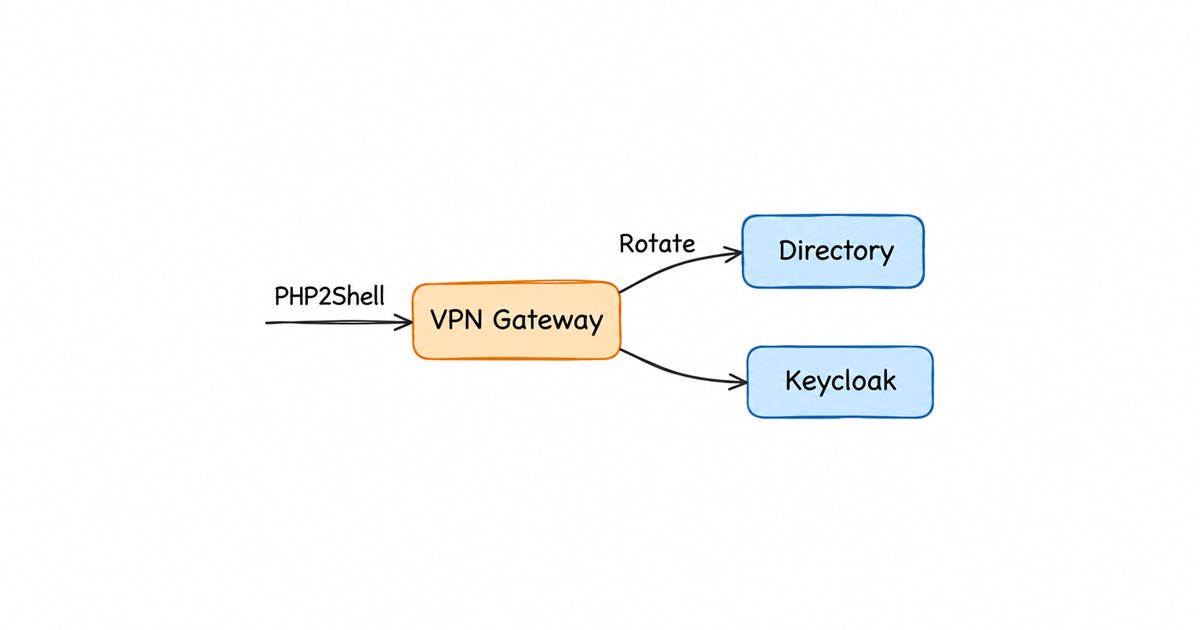
Attackers are exploiting PHP2Shell (CVE-2026-109618 and CVE-2026-109619) on unpatched Check Point Security Gateways to get in through the Mobile Access portal, escalate to root with CVE-2026-123039, deploy the TSGA backdoor and, in some cases, wipe VMware ESXi hosts (Check Point Research, The Hacker News). Install Check Point’s November Jumbo Hotfix, treat any gateway that was exposed as compromised until you have checked it, rotate every credential it stored, end its sessions and review VPN and admin sign-ins.
This post is for the engineers who run Check Point gateways for remote access VPN or the Mobile Access portal and want to know what to do today, beyond “patch now”. We cover the attack chain as Check Point describes it, the fixed versions from Check Point’s own advisories, what to hunt for, and then the part that lands on your identity systems: which credentials, keys and sessions a gateway holds, the order to rotate them, how to read the sign-in logs, and when you can call the gateway clean. We wrote about PHP2Shell itself when it was disclosed, and the response here follows the same pattern as our posts on Ivanti Connect Secure, Aruba AOS and BeyondTrust.
Key takeaways
- Check Point says attackers compromised “a couple of dozen unpatched systems, in a single region” between 30 October and 4 November 2026, with destructive activity in “a limited number of cases” (Check Point security advisory).
- Fixed: the November Jumbo Hotfix Accumulator fixes both PHP2Shell (sk1000302) and the root flaw (sk1000362); see the SK for the take for your version, and for what end-of-support releases get.
- CISA added CVE-2026-123039 to its Known Exploited Vulnerabilities catalog on 13 November (CISA alert).
- The backdoor can steal the gateway’s configuration and tamper with its firewall logs, so rotate the directory bind account, admin passwords, RADIUS secrets and VPN certificates even if your hunt comes back empty.
What happened to Check Point gateways?
Check Point Research published its analysis on 12 November 2026. It describes two waves: the first, on 30 October, targeted Israeli organizations and included destructive activity, and the second, on 2 November, reached organizations in several countries and sectors without evidence of destruction (Check Point Research). Check Point’s advisory says fixes had been available since 23 October, and The Hacker News quotes Check Point placing the Israeli activity “approximately one week after a security fix became available” (The Hacker News). Every compromised system Check Point describes was unpatched.
PHP2Shell is the pair of PHP runtime bugs that let an unauthenticated request run code on a server that handles web requests with PHP. The PHP project’s advisory of 21 October says “PHP 8.5.12, 8.4.27, 8.3.36 and 8.2.35 fix two critical vulnerabilities that can allow unauthenticated remote code execution” (php.net advisory), and CISA urged organizations to patch them immediately (CISA alert of 21 October, Wiz Research). The same advisory titles CVE-2026-109618 “RCE via OOM corruption” and CVE-2026-109619 “RCE via stale global state” (php.net advisory, CVE-2026-109618, CVE-2026-109619). Check Point’s gateway portals run on PHP, so they inherited the bugs, and Check Point rates both at CVSS 9.2 in its own advisory (sk1000302).
How did the attack chain work?
Check Point Research reconstructs the chain in five steps (Check Point Research):
- Initial access through the portal. The attacker exploited PHP2Shell against vulnerable Mobile Access portals and ran code as the portal’s service account. The researchers found PHP session files under
/opt/CPcvpn-R81.20/tmp/containing the stringupload_progress_pwn, and hundreds of Apache and PHP worker crashes on 30 October. - Web shells. PHP web shells were written into the portal’s templates directory with names made of
zz, random characters and a.tplextension, and uploads were staged through/tmp/.up.tpl. - Root through CVE-2026-123039. Check Point’s advisory for this flaw says the root
dynamic_serverprocess listens on/tmp/dynamic_socket, which on affected products “is created world-writable (0777) with no authentication of the connecting process”, so that “any authenticated local user can run arbitrary commands as root by writing a single request to the socket”; it adds that the attacker must “already have local code execution on the appliance” (sk1000362). Check Point rates it at CVSS 7.8 and says it “observed an active exploit of this vulnerability against a couple of dozen customers”. - The TSGA backdoor. As root, the attacker installed TSGA, which runs as
slot_CPconfigdaemon, and a companion library called TSProxy written to/lib/libcpfwcommon.sothat is injected into appliance processes and listens on TCP port 11072. Check Point lists TSGA’s capabilities as encrypted remote access, configuration theft, backup and snapshot persistence, process injection and tampering with the binary firewall logs. - Lateral movement and wiping. The attacker ran the gogo scanner from the gateway, moved over SSH to a VMware ESXi host by signing in as the
vpxuseraccount, and in the destructive cases ran a wiper calleddestroy_v6, which overwrites files with zeros, deletes them and leaves a note namedDREAM_ANNEXATION.txt.
Check Point links the tooling to a family ESET documented earlier in the year, but says “the evidence does not allow us to assess with high confidence the true nature of this operation” (The Hacker News). For your response, the attribution matters less than step 4: an attacker with root and a configuration-stealing implant had access to every secret the gateway uses to talk to your directory, your RADIUS servers and your management server.
On the ESXi side, Broadcom documents vpxuser as the account that “vCenter Server creates … on each ESX/ESXi host that it manages”, with a password vCenter generates and changes on its own schedule (Broadcom KB 320773). If your gateway could reach ESXi management over SSH, bring in whoever owns your virtualization platform; recovering wiped hosts is outside what this post covers.
Which versions are affected, and what is the fix?
The two advisories cover different products, so read both.
| PHP2Shell (sk1000302) | CVE-2026-123039 (sk1000362) | |
|---|---|---|
| Affected products | Force, Spark and Cloud Firewalls using an affected feature (below) | Force Firewalls, Management and Log Servers, Multi-Domain Security Management and Log Server, Maestro Orchestrator |
| Not affected | Management and Log Servers, Maestro Orchestrator, Check Point’s Portal and SaaS services | Spark Firewalls, Smart-1 Cloud |
| Affected versions | R81.20, R82, R82.10, R82.20; R80 to R81.10 (end of support); Spark R81.10.x and R82.00.x; Spark R77.20.x and R80.20.x (end of support) | R82.20, R82.10, R82, R81.20; R81.10 and R81 (end of support) |
| Fixed in | The November Jumbo take for your version, and the Spark builds, listed in the SK | The November Jumbo take for your version, listed in the SK |
| CVSS | 9.2 for each CVE | 7.8 |
Check Point’s advisory sk1000302 lists the affected products as firewalls “that use one or more of these features”: “Mobile Access Portal”, “Remote Access VPN with SSL Network Extender”, “Remote Access VPN with SAML Realm authentication enabled”, “Identity Awareness Captive Portal enabled”, “UserCheck Portal” and “Zero Phishing”. That list is longer than the headlines suggest, and a gateway that only offers a captive portal or UserCheck pages is still in scope.
Check Point’s advisory asks customers to “install the November Jumbo Hotfix on all Management Servers and Security Gateways as soon as operationally possible”, starting with internet-facing Mobile Access deployments (Check Point security advisory). If you cannot move to a new Jumbo take yet, sk1000302 also offers a standalone hotfix for R82.20, R82.10, R82, R81.20 and R81.10 that installs on top of existing takes and needs a reboot; it adds a minimum take for gateways that use the Mobile Access Portal, so read the row for your version before you schedule it.
What can you do if you cannot patch today?
Check Point’s advisory sk1000302 gives one interim mitigation: block multipart requests at the portal’s web server. Its procedure is to back up $CPDIR/web/Apache/conf/cp-httpd.conf, “add these lines at the end of the file”, making sure the block “appears only one time”, and restart the portals with the mpclient commands the SK lists for your version (on Spark, sfwd_stop ; sleep 3s ; sfwd_start):
<If "req('Content-Type') =~ /multipart/i">
 Require all denied
</If>
PHP2Shell is reached through multipart request parsing, which is why this works, and it also means anything on the portal that relies on file uploads stops working while the block is in place. The SK says that “in ClusterXL, you must perform the steps below on each ClusterXL Member”, gives a separate procedure for Security Groups, and, for installing the hotfix after the mitigation, says to “delete the added lines to remove the mitigation” first. It also says “Check Point Firewalls R82.20 protect themselves through the Check Point IPS signatures ‘PHP Remote Code Execution’ even when IPS is not enabled and HTTPS Inspection is not active.”
For CVE-2026-123039, Check Point’s advisory gives one mitigation: “Stop the dynamic_server process and prevent it from restarting” with dbset, which it says “causes the Dynamic CLI commands listed in sk144112 to fail” (sk1000362). The same SK lists R81.10 and R81 as affected end-of-support versions, and its fix list names Jumbo takes only for R82.20, R82.10, R82 and R81.20, so on those two older releases the mitigation is the option it gives. If you are on an end-of-support release, the realistic plan is to take the portal off the internet now and upgrade to a supported release.
In what order should you respond?
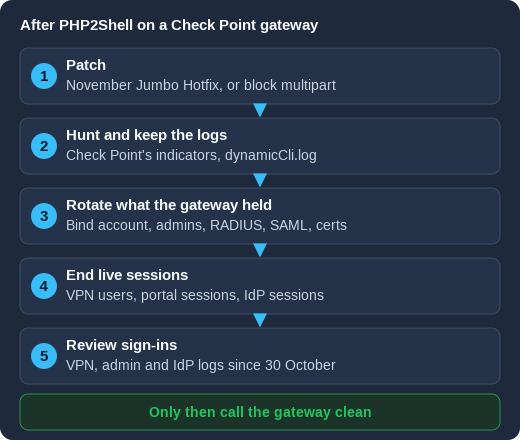
Patch or block multipart requests first, hunt for Check Point’s indicators and copy the logs off the box, rotate the secrets the gateway held, end the VPN, portal and identity provider sessions, and review sign-ins from 30 October onward. Only after all five do you call the gateway clean.
The order matters because each step depends on the one before it. Rotating a secret on a gateway that still runs the attacker’s implant gives the attacker the new secret, and ending sessions before you rotate lets someone with a stolen password sign straight back in. NIST SP 800-61 Revision 3, NIST’s incident response recommendations built on the Cybersecurity Framework 2.0, is a good reference for the wider process around these steps if your organization does not already have one.
- Patch or isolate. Install the fixed take or the hotfix, or apply the multipart block and restrict who can reach the portal.
- Hunt and preserve. Run the checks in the next section and copy the gateway’s logs somewhere the gateway cannot write to.
- Rotate, in the order of the rotation section below.
- End sessions on the gateway and at your identity provider.
- Review sign-ins for the window from 30 October to the time you rotated.
What should you look for on the gateway?
Check Point’s advisory lists these indicators (Check Point security advisory), and the research post adds file paths and hashes (Check Point Research):
- Connections from 130.94.19[.]204 and 130.94.19[.]168 (written with brackets, as Check Point does, so they are not clickable).
- The string
upload_progress_pwnin PHP session files. - A process or binary pretending to be
CPconfigdaemon, includingslot_CPconfigdaemon, and the files/tmp/.bd.logand/lib/libcpfwcommon.so. - Template files named
zzfollowed by random characters with a.tplextension, orchallenge_render.tpl, in the portal’s templates directory. - Scanner or wiper tools under
/tmpwith “scanner” or “wiper” in the name, and a note mentioning “Dream Annexation”. - Unexplained gaps in firewall traffic logs, especially after a logging daemon crash.
For the root flaw, Check Point’s advisory says “the vulnerable daemon logs every command it receives to /var/log/dynamicCli.log” and gives three grep checks to run on each gateway or cluster member: one for “received commands that do not use the expected Clish wrapper”, one for “use of the system() sink”, and one for “commands commonly associated with exploitation attempts”, such as id, whoami, /etc/shadow, curl, wget, base64, useradd or authorized_keys. It says any command without the wrapper “may indicate that a command was executed as root through the socket and requires investigation” (sk1000362). After patching, the SK says ls -l /tmp/dynamic_socket “should show srw-rw---- root config (0660)”, and that “Rejected connection from unauthorized uid” lines in the same log mean an escalation attempt was blocked, to be correlated with your portal and authentication logs.
Check Point is clear that “absence of a match does not rule out compromise”. TSGA can tamper with the gateway’s binary firewall logs, so logs that were forwarded to your Management Server or a SIEM during the window are worth more than what is still on the box. The Management Server keeps audit logs of administrator actions, and gateways send their network logs to it (Check Point Logging and Monitoring Administration Guide). If you find a match, contact Check Point Support, as the advisory asks.
Which credentials and secrets does a gateway hold?
Before you can rotate, you need the list. A gateway that terminates remote access usually holds most of these, and an attacker with root and a configuration-stealing implant could read all of them.
| What the gateway holds | Where it is configured | What an attacker can do with it |
|---|---|---|
| Directory bind account | The LDAP Account Unit’s Login DN and Password (Security Management Administration Guide) | Query your directory for users, groups and attributes, as attackers did with an appliance’s Active Directory account in the Ivanti Connect Secure campaign |
| User passwords | Typed into the portal or VPN client at sign-in | Sign in as those users anywhere the same password works |
| RADIUS shared secret | The RADIUS server object’s Shared Secret field (Security Management Administration Guide) | Impersonate the gateway to your RADIUS server, or read RADIUS traffic that depends on the secret |
| Gaia admin and local accounts | Gaia users on the gateway (Gaia Administration Guide) | Sign back in to the gateway after you remove the implant |
| VPN and SIC certificates | Issued to the gateway by the Internal Certificate Authority (Site to Site VPN Administration Guide) | Present the gateway’s identity with its private key |
| SAML configuration | The identity provider object for Remote Access VPN or Mobile Access | Learn which identity provider and application to target next |
| Live sessions | Portal and VPN session state on the gateway | Continue a signed-in user’s session |
Identity you do not have to patch yourself
Skycloak is a managed identity platform for SSO, MFA, SCIM and audit logs. When an advisory lands, the fix is ours to ship: Keycloak 26.7.2 closed an account takeover through password reset and customers had it the same day upstream published it.
What should you rotate, and in what order?
Rotate on each gateway only after it is patched and you have checked it, and if you found indicators of compromise, after it has been rebuilt (see the last section). Then go from the secrets that open the most doors to the ones that open the fewest.
- The directory bind account. Change the password of the account in the LDAP Account Unit at the directory first, then on the Account Unit in SmartConsole, and install policy. Check Point notes that “if all the configured servers use the same login credentials, you can modify them simultaneously” (Security Management Administration Guide). While you are there, check what that account can read: a VPN only needs to look users up. If your Keycloak realm federates the same directory through LDAP user federation with the same bind account, change it there in the same window or Keycloak’s sign-ins against the directory will start failing.
- Gaia administrator passwords on the gateway. Use
set userwith thepasswordoption in Clish, which prompts for the new password twice, rather thannewpass, which puts the password in plain text on the command line and in the command history (Gaia Administration Guide). Remove local accounts you did not create, and check SSHauthorized_keysfiles, which the sk1000362 checks also look for. - Passwords of users who signed in during the window. Passwords typed into the portal or VPN client passed through a gateway the attacker controlled. If your gateway authenticates users against the directory, a forced password reset for everyone who signed in between 30 October and your patch is the conservative choice, and it covers the other systems where those users reuse the same password.
- The RADIUS shared secret, on both the RADIUS server and the RADIUS server object in SmartConsole, then install policy (Security Management Administration Guide).
- The gateway’s certificates. Check Point’s guide says removing a compromised certificate “automatically triggers creation of a new certificate” from the Internal Certificate Authority, and that a certificate “is revoked when the certificate object is removed” (Site to Site VPN Administration Guide). If you rebuild the gateway, you re-establish its trust with the management server through
cp_conf sic initand a new activation key (CLI Reference Guide). Do not reach forfwm sic_reseton the management server: Check Point warns that it “breaks trust in all Internal CA certificates and SIC trust across the managed environment” and does not recommend it “except for real disaster recovery” (Security Management Administration Guide). - Everything else the gateway stored: any other password, API key, certificate or private key configured on it, including anything you uploaded for a SAML identity provider or a portal. If the gateway could reach ESXi, ask your virtualization team to review
vpxuserand the host’s root account too.
How do you end live sessions after rotating?
Rotating a password does not end a session that is already open, so do this right after rotation. On the gateway, Check Point’s Session Visibility and Management Utility, RAsession_util, lists and terminates Mobile Access and remote access sessions, for all users, one user or one session ID (Mobile Access Administration Guide):
RAsession_util show sessions_num
RAsession_util terminate all
RAsession_util terminate byuser jdoe
The guide notes that the utility “is disabled by default”, so enable it first as the guide describes, and that Capsule Connect and Capsule VPN sessions cannot be terminated this way.
If the VPN signs users in through a SAML identity provider such as Keycloak, end the sessions there too, because a user with a live identity provider session can get a new VPN session without typing a password. Keycloak’s Server Administration Guide says “if your system is compromised, you can revoke all active sessions and access tokens” (Keycloak, revoking active sessions). Revoking for the whole realm logs out everyone in it, so if you can name the affected users, revoke their sessions one by one instead. Afterwards, shorter session and token lifetimes limit how long any session that slips past you stays useful.
How do you tell whether VPN or admin sign-ins were abused?
Read three sets of logs for the window from 30 October to the time you rotated, and prefer copies that left the gateway at the time.
- Administrator activity. The Management Server’s audit logs record “actions taken by administrators” (Check Point Logging and Monitoring Administration Guide). Look for policy installs, new administrators, changed Account Units and changed RADIUS or SAML objects that nobody on your team made. On the gateway, Gaia writes system logs to
/var/log/messagesby default (Gaia Administration Guide), where you can look for SSH and WebUI sign-ins at unusual times or from unusual addresses, and/var/log/dynamicCli.loghas the root commands described above. - VPN and portal sign-ins. In the gateway’s network logs, look for successful sign-ins from addresses or countries a user has never used, one user signed in from two places at once, accounts that signed in for the first time in months, and bursts of failed sign-ins followed by a success.
- Your identity provider. If the VPN uses SAML, the identity provider has its own record. Keycloak’s list of event types includes a Login event for when “a user logs in” (Keycloak, event types), and its guide shows failed sign-ins logged as
type=LOGIN_ERRORwitherror=invalid_user_credentials(Keycloak, auditing user events), so you can line up identity provider sign-ins for the VPN client with gateway sessions. Our Keycloak auditing and event logging guide covers turning these events on and keeping them long enough to be useful in an incident.
A sign-in from the attacker’s addresses, or any administrator change you cannot explain, moves the gateway from “check it” to “rebuild it”.
When can you call the gateway clean?
We would call a gateway clean only when all of these are true:
- It runs the fixed take the SKs list for your version, or a later one, or the sk1000302 hotfix, and
/tmp/dynamic_socketshows mode 0660. - None of Check Point’s indicators match, the
dynamicCli.logchecks find nothing, and the logs you forwarded off the box show no gaps you cannot explain. - Every secret in the rotation list has been changed, and sessions on the gateway and the identity provider have been ended since then.
- The sign-in review found nothing unexplained.
If any indicator matched, rebuild rather than clean. Check Point Research lists “backup and snapshot persistence” among TSGA’s capabilities (Check Point Research), which means a Gaia snapshot or backup taken after 30 October may bring the implant back. Reinstall from Check Point media, apply the fixed take, rebuild the configuration from the management server, re-establish SIC with a new activation key, and only then rotate the secrets a final time, so the new values never touch a host the attacker controlled.
How do you harden remote login behind an identity provider?
An identity provider does not protect against PHP2Shell. The bug runs before anyone authenticates, and sk1000302 lists “Remote Access VPN with SAML Realm authentication enabled” among the affected features, so a SAML-enabled gateway still needs the patch.
What an identity provider changes is what a compromised gateway hands over. Check Point’s Remote Access VPN can “recognize identities from a cloud-based SAML Identity Provider”, and its guide says “to use Multiple Factor Authentication, configure the external Identity Provider to have multiple verification steps” (Remote Access VPN Administration Guide); the Mobile Access guide covers the same setup for the portal (Mobile Access Administration Guide). With SAML, users type their password at the identity provider rather than into the gateway, so the gateway no longer sees directory passwords, and a stolen password is not enough on its own once the identity provider asks for a second factor. Check Point’s guides use Microsoft Entra ID and Okta as examples; Keycloak’s guide says it “supports SAML 2.0 for registered applications” (Keycloak, creating a SAML client), so test the exact setup against your gateway version before you rely on it.
In a Keycloak realm, the pieces are:
- A second factor. Keycloak’s guide has OTP policies “for setting up a FreeOTP or Google Authenticator One-Time Password generator”, and says it “provides support for W3C Web Authentication (WebAuthn)” (Keycloak, WebAuthn). Its 2FA conditional workflow examples include one that denies access to a user who has no second factor configured.
- Brute force detection, which the guide says “can permanently or temporarily disable a user account if the number of login failures exceeds a specified threshold” and which “is disabled by default”, so check that it is turned on for the realm (Keycloak, brute force attacks).
- Session limits that end idle VPN sign-ins at the identity provider on a schedule you set, as in our session timeout guide.
Frequently asked questions
Is PHP2Shell being exploited on Check Point gateways?
Yes. Check Point says attackers compromised a couple of dozen unpatched systems between 30 October and 4 November 2026 through the Mobile Access portal, and CISA added the root escalation, CVE-2026-123039, to the KEV catalog on 13 November (Check Point security advisory, CISA alert).
Which Check Point versions fix PHP2Shell and CVE-2026-123039?
The November Jumbo Hotfix Accumulator fixes both; see sk1000302 and sk1000362 for the take for your version, and sk1000302 for the Spark builds.
Is my gateway affected if I do not use Mobile Access?
Possibly. sk1000302 also lists Remote Access VPN with SSL Network Extender, Remote Access VPN with SAML authentication, the Identity Awareness Captive Portal, the UserCheck Portal and Zero Phishing. CVE-2026-123039 also affects Management and Log Servers, but it needs code already running on the box.
Do I need to rotate credentials if the hunt found nothing?
For a gateway that was exposed and unpatched after 30 October, we would. Check Point says the absence of indicators “does not rule out compromise”, and the backdoor can tamper with firewall logs, so a clean hunt is weaker evidence than it looks.
Does putting the VPN behind SAML and MFA stop this attack?
No. PHP2Shell runs before authentication, and SAML-enabled remote access is on the affected list. SAML with MFA limits what a compromised gateway exposes, because users no longer type directory passwords into it and a stolen password needs a second factor.
What to do next
Today, find every gateway that uses one of the features in sk1000302, install the November Jumbo take or the hotfix, and block multipart requests on any you cannot patch yet. Then run Check Point’s indicator checks and the dynamicCli.log greps, copy the logs off the box, rotate the bind account, Gaia passwords, RADIUS secret, certificates and the passwords of users who signed in during the window, end the sessions on the gateway and the identity provider, and review sign-ins from 30 October onward. Once the gateway is clean, move remote login behind an identity provider with enforced MFA; if you want that identity provider run for you, take a look at Skycloak’s managed Keycloak hosting.
Sources
- Check Point, “Security Advisory: Active Exploitation of PHP2Shell and Local Privilege Escalation”, 12 November 2026, retrieved 2026-11-18, https://blog.checkpoint.com/security/security-advisory-active-exploitation-of-php2shell-and-local-privilege-escalation/
- Check Point Research, “PHP2Shell Exploitation on Check Point Gateway”, 12 November 2026, retrieved 2026-11-18, https://research.checkpoint.com/2026/php2shell-exploitation-on-check-point-gateway/
- Check Point, sk1000302 (PHP2Shell, CVE-2026-109618 and CVE-2026-109619), retrieved 2026-11-18, https://support.checkpoint.com/results/sk/sk1000302
- Check Point, sk1000362 (CVE-2026-123039), retrieved 2026-11-18, https://support.checkpoint.com/results/sk/sk1000362
- The Hacker News, “Hackers Exploit PHP2Shell Flaws in Check Point Gateways to Deploy TSGA Backdoor and Wipe ESXi Files”, 13 November 2026, retrieved 2026-11-18, https://thehackernews.com/2026/11/hackers-exploit-php2shell-flaws-in.html
- CISA, “CISA Adds Two Known Exploited Vulnerabilities to Catalog”, 13 November 2026, retrieved 2026-11-18, https://www.cisa.gov/news-events/alerts/2026/11/13/cisa-adds-two-known-exploited-vulnerabilities-catalog
- CISA, Known Exploited Vulnerabilities Catalog and JSON feed, retrieved 2026-11-18, https://www.cisa.gov/known-exploited-vulnerabilities-catalog
- CISA, “Critical Vulnerabilities in PHP Require Immediate Patching”, 21 October 2026, retrieved 2026-11-18, https://www.cisa.gov/news-events/alerts/2026/10/21/critical-vulnerabilities-php-require-immediate-patching
- PHP, “Critical remote code execution vulnerabilities, update now”, 21 October 2026, retrieved 2026-11-18, https://www.php.net/index.php#2026-10-21-5
- CVE Program, CVE-2026-109618 and CVE-2026-109619, retrieved 2026-11-18, https://www.cve.org/CVERecord?id=CVE-2026-109618 and https://www.cve.org/CVERecord?id=CVE-2026-109619
- Wiz Research, “PHP2Shell”, retrieved 2026-11-18, https://www.wiz.io/blog/php2shell-php-rce
- NIST, SP 800-61 Rev. 3, “Incident Response Recommendations and Considerations for Cybersecurity Risk Management: A CSF 2.0 Community Profile”, April 2025, https://csrc.nist.gov/pubs/sp/800/61/r3/final
- Check Point R82 administration guides (Security Management, Gaia, Remote Access VPN, Mobile Access, Site to Site VPN, Logging and Monitoring, CLI Reference), retrieved 2026-11-18, https://sc1.checkpoint.com/documents/R82/WebAdminGuides/EN/
- Broadcom, KB 320773, “Configure expiry settings for the vpxuser”, retrieved 2026-11-18, https://knowledge.broadcom.com/external/article/320773/configure-expiry-settings-for-the-vpxuse.html
- Keycloak, Server Administration Guide, retrieved 2026-11-18, https://www.keycloak.org/docs/latest/server_admin/