Application Management
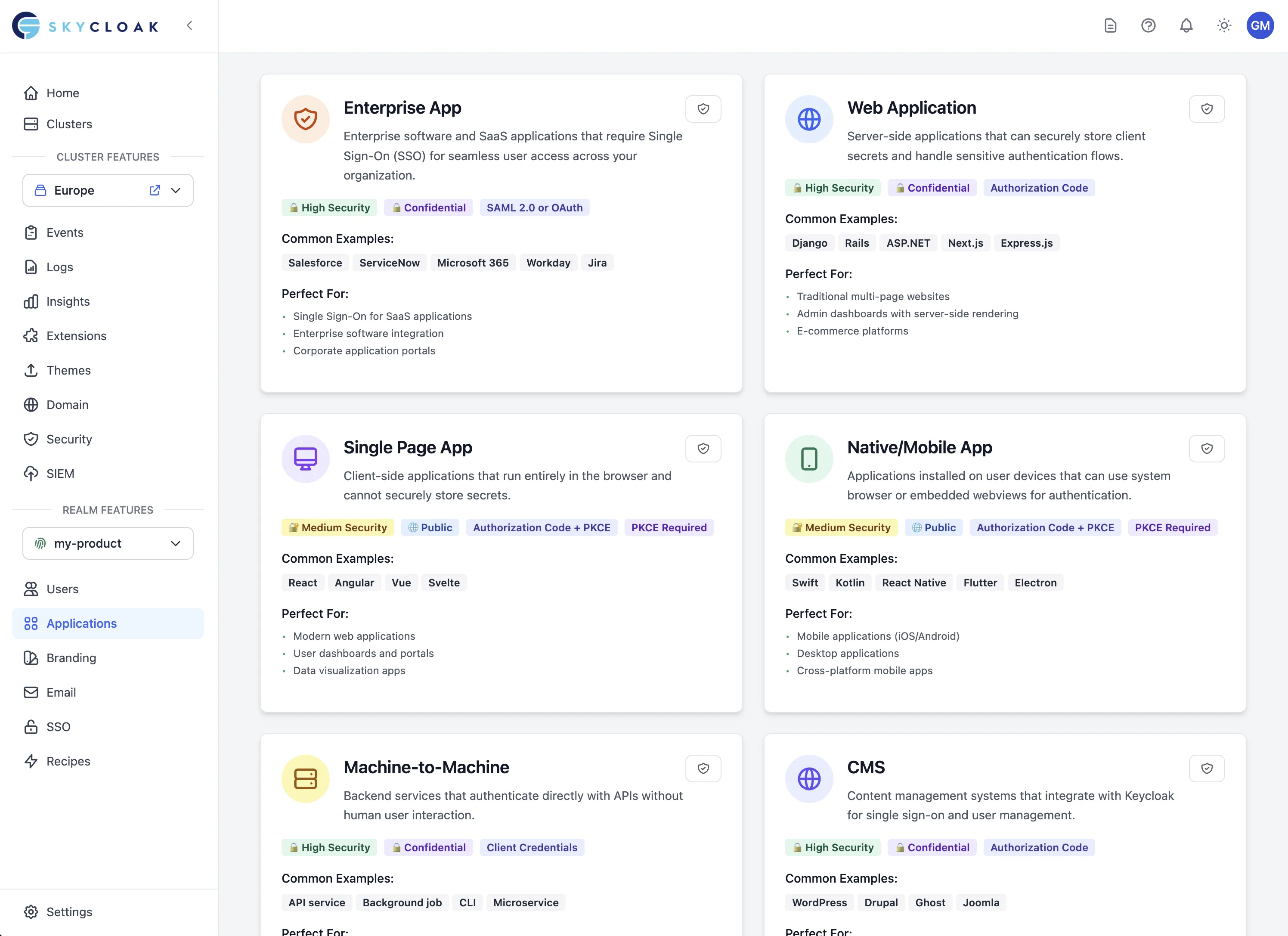
Skycloak’s Application Management system provides intelligent guidance and streamlined workflows for integrating your applications with Keycloak authentication. From initial setup to production deployment, get step-by-step guidance tailored to your technology stack.
Overview
The Application Management feature helps you:
- Guided Integration: Step-by-step setup for popular frameworks
- Technology Detection: Automatic configuration based on your stack
- Code Generation: Ready-to-use integration code and examples
- Testing Tools: Built-in testing and validation capabilities
- Documentation: Framework-specific guides and best practices
Application Wizard
Getting Started
The Application Wizard guides you through the entire integration process:
-
Application Type Selection
- Single Page Applications (SPA)
- Traditional Web Applications
- Mobile Applications
- API/Backend Services
- Machine-to-Machine Applications
-
Technology Selection
- Frontend frameworks (React, Vue, Angular, etc.)
- Backend technologies (Node.js, Python, Java, etc.)
- Mobile platforms (iOS, Android, React Native, etc.)
- API frameworks (Express, FastAPI, Spring Boot, etc.)
-
Configuration Generation
- Automatic client configuration
- Environment-specific settings
- Security best practices applied
- Integration code samples
Supported Technologies
Frontend Frameworks:
- React: Complete integration with popular libraries
- Vue.js: Vue 2 and Vue 3 support with composition API
- Angular: Full Angular integration with guards and interceptors
- Vanilla JavaScript: Pure JavaScript implementation
- Next.js: Server-side rendering and static site generation
- Nuxt.js: Vue-based universal applications
Backend Technologies:
- Node.js: Express, Koa, and Fastify integrations
- Python: Django, Flask, and FastAPI implementations
- Java: Spring Boot and JAX-RS integrations
- PHP: Laravel, Symfony, and vanilla PHP
- Go: Gin, Echo, and native implementations
- .NET: ASP.NET Core and Web API
Mobile Platforms:
- React Native: Cross-platform mobile applications
- iOS: Native Swift and Objective-C
- Android: Native Java and Kotlin
- Flutter: Cross-platform mobile development
- Xamarin: Microsoft mobile development platform
Application Configuration
Basic Configuration
Application Details:
- Name: Human-readable application name
- Description: Purpose and functionality description
- Type: Application architecture type
- Environment: Development, staging, or production
Client Settings:
- Client ID: Unique application identifier
- Client Secret: Secure authentication credential (when applicable)
- Redirect URIs: Allowed callback URLs after authentication
- Logout URIs: Post-logout redirect destinations
Advanced Configuration
Authentication Flow:
- Authorization Code Flow: Standard for web applications
- PKCE: Enhanced security for public clients
- Implicit Flow: Legacy flow for simple applications
- Client Credentials: Machine-to-machine authentication
- Device Flow: For devices with limited input capabilities
Token Configuration:
- Access Token Lifespan: Token validity duration
- Refresh Token Settings: Refresh token behavior
- ID Token Claims: Custom claims and mappings
- Token Encryption: Advanced security options
Scope and Permissions:
- Default Scopes: Automatically granted permissions
- Optional Scopes: User-consent required permissions
- Audience Restrictions: Token audience limitations
- Role Mappings: Application-specific role assignments
Integration Guidance
Step-by-Step Integration
1. Initial Setup
# Example for React application
npx create-react-app my-app
cd my-app
npm install @skycloak/react-auth
2. Configuration
// src/auth-config.js
export const authConfig = {
  realm: 'your-realm',
  clientId: 'your-client-id',
  serverUrl: 'https://your-cluster.skycloak.io'
};
3. Integration Implementation
// src/App.js
import { AuthProvider, useAuth } from '@skycloak/react-auth';
import { authConfig } from './auth-config';

function App() {
  return (
    <AuthProvider config={authConfig}>
      <Dashboard />
    </AuthProvider>
  );
}
4. Protected Routes
// src/Dashboard.js
import { ProtectedRoute } from '@skycloak/react-auth';

function Dashboard() {
  return (
    <ProtectedRoute>
      <h1>Protected Content</h1>
    </ProtectedRoute>
  );
}
Framework-Specific Guides
React Integration:
- Hooks-based authentication state management
- Context providers for global auth state
- Protected route components
- Automatic token refresh handling
Vue.js Integration:
- Composition API authentication composables
- Vue Router integration and guards
- Reactive authentication state
- Plugin-based configuration
Angular Integration:
- Service-based authentication management
- Route guards for protected routes
- HTTP interceptors for token management
- Dependency injection patterns
Testing and Validation
Built-in Testing Tools
Authentication Testing:
- Login Flow Validation: Test complete authentication flows
- Token Verification: Validate token format and claims
- Logout Testing: Verify proper session cleanup
- Refresh Token Testing: Test token renewal processes
Integration Testing:
- API Endpoint Testing: Test protected API endpoints
- CORS Configuration: Validate cross-origin settings
- Redirect URI Testing: Test callback URL configurations
- Error Handling: Test error scenarios and recovery
Development Tools
Debug Dashboard:
- Real-time authentication events
- Token inspection and decoding
- Network request monitoring
- Error diagnosis and troubleshooting
Test Users:
- Pre-configured test accounts
- Different role and permission sets
- Automated test scenario execution
- Performance testing capabilities
Security Best Practices
Implementation Security
Token Management:
- Secure token storage (httpOnly cookies recommended)
- Automatic token refresh implementation
- Proper token expiration handling
- Cross-site scripting (XSS) protection
Network Security:
- HTTPS enforcement for all communications
- Proper CORS configuration
- Content Security Policy (CSP) implementation
- Secure redirect URI validation
Client Configuration:
- Public vs confidential client types
- PKCE implementation for public clients
- Client secret protection and rotation
- Minimum required scope principle
Vulnerability Prevention
Common Security Issues:
- Token leakage through logs or error messages
- Insecure redirect URI configurations
- Cross-site request forgery (CSRF) attacks
- Session fixation vulnerabilities
Prevention Strategies:
- Regular security audits and reviews
- Automated vulnerability scanning
- Security-focused code reviews
- Penetration testing recommendations
Production Deployment
Deployment Checklist
Pre-Deployment:
- Security review completed
- Performance testing passed
- Error handling implemented
- Monitoring and logging configured
- Backup and recovery plan ready
Configuration Review:
- Production redirect URIs configured
- Client secrets properly secured
- Token lifespans appropriately set
- Scope and permissions reviewed
- Rate limiting configured
Post-Deployment:
- Authentication flows tested
- Monitoring dashboards configured
- Error alerts set up
- Performance metrics baseline established
- Documentation updated
Monitoring and Maintenance
Performance Monitoring:
- Authentication success rates
- Token refresh frequency
- API response times
- Error rates and patterns
Security Monitoring:
- Failed authentication attempts
- Suspicious user behavior
- Token abuse patterns
- Compliance audit trails
Troubleshooting
Common Integration Issues
Authentication Failures:
- Invalid client configuration
- Incorrect redirect URI setup
- Token expiration issues
- Network connectivity problems
Configuration Problems:
- Missing or incorrect scopes
- Wrong authentication flow selection
- CORS configuration errors
- SSL/TLS certificate issues
Performance Issues:
- Slow authentication responses
- Token refresh failures
- Network latency problems
- Resource exhaustion
Debugging Tools
Built-in Diagnostics:
- Real-time error logging
- Authentication flow visualization
- Token introspection tools
- Network request analysis
External Tools:
- Browser developer tools integration
- Postman collection for API testing
- Curl command examples
- SDK debugging features
Advanced Features
Multi-Environment Support
Environment Management:
- Development, staging, and production configurations
- Environment-specific client settings
- Automated deployment pipelines
- Configuration synchronization
Environment Variables:
- Secure credential management
- Environment-specific URLs and settings
- Configuration templating
- Secret rotation automation
Enterprise Features
Advanced Analytics:
- Application usage analytics
- User behavior tracking
- Performance metrics
- Security event monitoring
Compliance Support:
- Audit trail logging
- Compliance reporting
- Data retention policies
- Regulatory requirement tracking
Custom Integrations:
- Webhook-based notifications
- Custom authentication flows
- API gateway integration
- Legacy system connectors
Integration Documentation
Once you’ve created your application, follow our comprehensive integration guides:
🚀 Quick Links by Technology
Frontend Frameworks:
- React Integration Guide - Hooks, context, and protected routes
- Angular Integration Guide - Guards, interceptors, and services
- Vue.js Integration Guide - Composition API and plugins
- Next.js Integration Guide - Server components and NextAuth
- Plain JavaScript Guide - Vanilla JS implementation
Backend Technologies:
- Node.js Integration Guide - Express, Fastify, and more
- Spring Boot Integration Guide - Spring Security setup
- Django Integration Guide - Python authentication
- .NET Core Integration Guide - ASP.NET middleware
- Laravel Integration Guide - PHP authentication
- Go Integration Guide - Middleware and JWT validation
Mobile Platforms:
- React Native Guide - Cross-platform mobile
- Flutter Guide - Dart implementation
- iOS Guide - Swift with AppAuth
- Android Guide - Kotlin with AppAuth
📚 Complete Integration Resources
- 5-Minute Quickstart - Get running fast
- Integration Overview - Understanding OAuth flows