Billing & Subscription Management
The Billing section helps you manage your Skycloak subscription, track usage, view invoices, and update payment methods. Understanding your billing is crucial for optimizing costs and ensuring uninterrupted service.
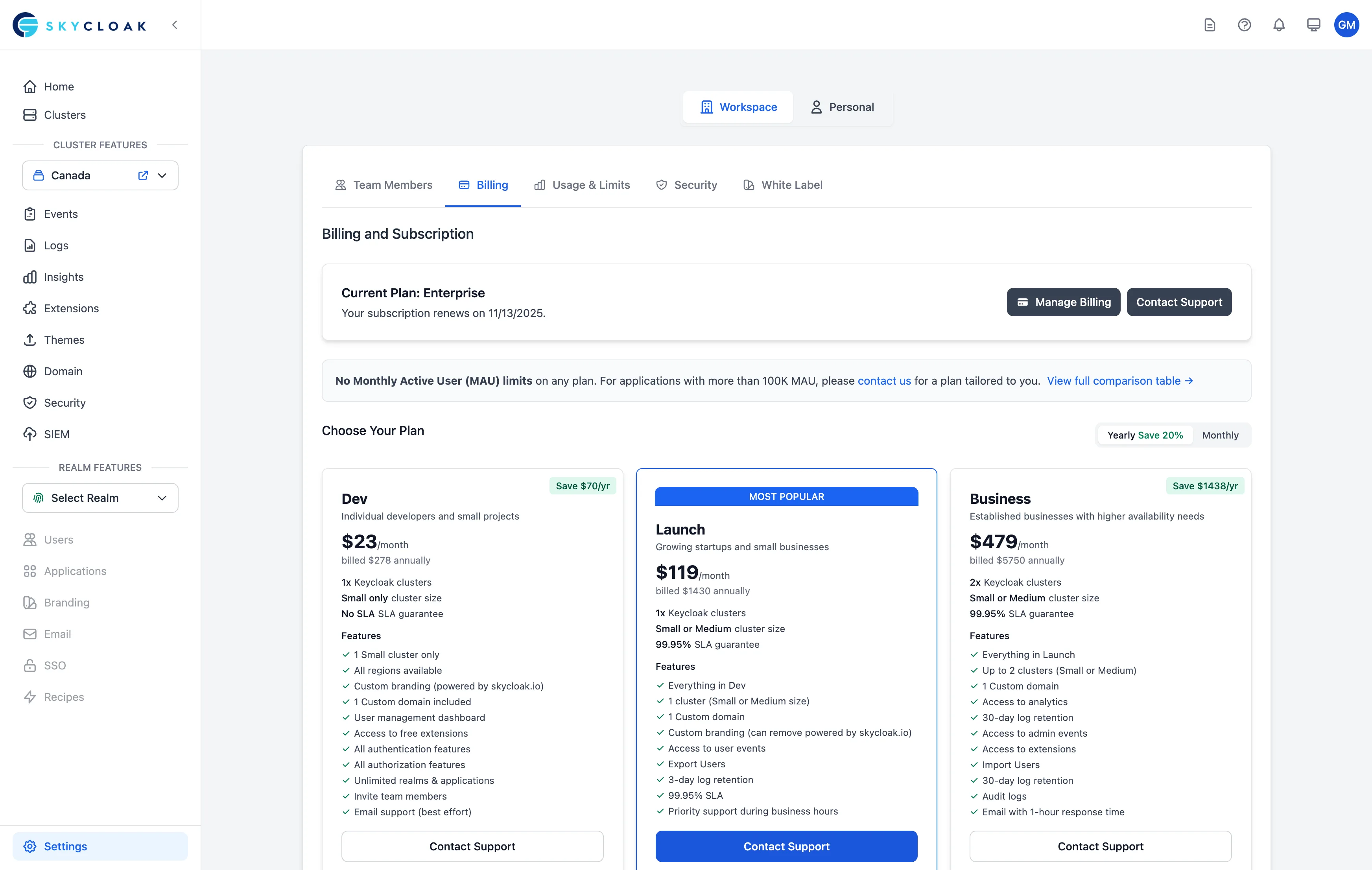
Understanding Skycloak Billing
Billing Model
Skycloak uses a hybrid billing model:
- Base Plan Fee: Monthly subscription for features and resources
- Usage-Based Charges: Additional fees for exceeding plan limits
- Add-ons: Optional features and services
Billing Cycle
- Bills generated monthly on your signup date
- Usage calculated at end of billing period
- Payment processed automatically
- Invoices available immediately
Accessing Billing Information
Navigation
- Go to Settings in your dashboard
- Click on Workspace tab
- Select Billing section
Permissions
- workspace:owner: Full billing access and subscription management
- workspace:billing: View and manage all billing aspects
- workspace:admin: View billing information only
- cluster:admin: No billing access
- cluster:viewer: No billing access
Subscription Management
Current Plan Overview
Your billing dashboard shows:
- Plan Name: Developer, Launch, Business, or Enterprise
- Monthly Cost: Base subscription fee
- Billing Period: Current cycle dates
- Payment Status: Active, Trial, or Past Due
Plan Features
View what’s included in your plan:
- Number of clusters allowed
- Monthly Active Users (MAU) limit
- Available regions
- Support level
- Feature access
Usage Metrics
Monitor your current usage:
- Active Users: Current MAU count
- Cluster Hours: Resource consumption
- Storage Used: Database and file storage
- API Calls: If applicable
Usage Alerts
Set up alerts to avoid overages:
- Click “Configure Alerts”
- Set thresholds (e.g., 80% of MAU limit)
- Choose notification method
- Save alert preferences
Upgrading Your Plan
When to Upgrade
Consider upgrading when:
- Approaching usage limits
- Need additional features
- Require better support
- Planning for growth
Upgrade Process
- Click “Change Plan”
- Select new plan
- Review feature comparison
- Confirm changes
Proration
When upgrading:
- Immediate access to new features
- Prorated charge for current month
- Credit for unused time on old plan
- New rate starts next billing cycle
Example:
Current Plan: Developer ($29/month)
Upgrade to: Launch ($149/month)
Days left in cycle: 15
Prorated charge: $60
Credit from old plan: $14.50
Amount due: $45.50
Downgrading Your Plan
Before Downgrading
Check compatibility:
- Current usage within new limits
- Features you’ll lose access to
- Data retention policies
- Active configurations
Downgrade Process
- Review current usage
- Reduce resources if needed
- Select lower plan
- Acknowledge feature changes
- Confirm downgrade
Grace Period
When downgrading:
- 30-day grace period for adjustments
- Warnings for exceeding limits
- Automatic resource limiting after grace period
Payment Methods
Adding a Payment Method
- Go to Payment Methods section
- Click “Add Payment Method”
- Enter card details or bank information
- Set as default if desired
Supported Payment Types
- Credit Cards: Visa, MasterCard, Amex
- Debit Cards: With recurring payment support
- Bank Transfer: Enterprise only
- ACH/SEPA: For qualified accounts
Managing Payment Methods
- Set default payment method
- Remove outdated cards
- Update billing address
- Enable backup payment method
Invoices and Receipts
Invoice Access
All invoices available in billing section:
- PDF download option
- Email delivery
- Detailed line items
- Tax information included
Invoice Details
Each invoice includes:
- Workspace information
- Billing period
- Base subscription fee
- Usage charges (if any)
- Credits or adjustments
- Tax calculation
- Total amount
Tax Handling
- Automatic tax calculation based on location
- VAT support for EU customers
- Tax exemption certificates accepted
- Updated rates automatically applied
Free Trial Management
Trial Overview
All new accounts start with:
- 14-day free trial
- Full feature access
- No credit card required
- Automatic conversion option
Trial Limitations
During trial:
- 1 small cluster only
- US region only
- Standard support
- No custom domains
Converting from Trial
Options when trial ends:
- Auto-convert: Add payment method for seamless transition
- Manual upgrade: Choose plan and add payment
- Extend trial: Contact sales for extension
- Downgrade: Move to free tier (if available)
Managing Costs
Cost Optimization Tips
-
Right-size Clusters
- Use small clusters for development
- Scale up only for production
- Shut down unused clusters
-
Monitor MAU
- Review active user trends
- Clean up inactive users
- Implement user lifecycle
-
Optimize Features
- Disable unused features
- Consolidate applications
- Review integration usage
Budget Alerts
Set spending limits:
- Define monthly budget
- Configure alert thresholds
- Set up notifications
- Review spending trends
Billing Support
Common Billing Issues
Payment Failed
- Check card expiration
- Verify billing address
- Confirm sufficient funds
- Update payment method
Invoice Questions
- Review usage details
- Check billing period
- Verify tax calculations
- Contact support
Plan Confusion
- Compare plan features
- Review usage patterns
- Calculate projected costs
- Get personalized recommendation
Getting Help
For billing support:
- 📧 Email: [email protected]
- 💬 Chat: Available in dashboard
- 📞 Phone: Enterprise customers
- 🎫 Tickets: Via support portal
Enterprise Billing
Custom Pricing
Enterprise customers receive:
- Volume discounts
- Custom contracts
- Flexible payment terms
- Dedicated account management
Invoice Processing
Enterprise features:
- Purchase orders accepted
- NET 30/60/90 terms
- Custom billing cycles
- Consolidated invoicing
Compliance
Supporting requirements:
- SOC 2 reports available
- Custom security assessments
- Vendor questionnaires
- Procurement support
Accessing Billing Information
All billing and subscription management is handled through the Skycloak dashboard. For automated billing needs or enterprise requirements, please contact our support team.
Frequently Asked Questions
Can I pause my subscription?
Yes, contact support for temporary suspension options.
Do you offer refunds?
14-day money-back guarantee for new customers.
Can I change billing currency?
Currency is set based on location but can be changed by support.
Are there setup fees?
No setup fees for standard plans. Enterprise may have onboarding fees.
Can I pay annually?
Yes, annual payment offers 2 months free. Contact sales.
Next Steps
- Review subscription plans in detail
- Set up usage alerts to avoid overages
- Optimize your costs with best practices
- Contact sales for enterprise pricing